Automating Image Compression for Jekyll Blogs with C# GitHub Actions
January 31, 2026 by Anuraj
DevOps GitHub Actions C#
In this post, I’ll walk you through building a custom GitHub Action in C# that automatically compresses images whenever you add a new blog post.
First we will be creating the dotnet application which compresses the image using Image sharp. Then we will be integrating it with GitHub Actions - which can accepts inputs and outputs from GitHub actions workflow. Then we will learn how we can integrate it to an existing GitHub Actions workflow.
We can create the dotnet console app using the command dotnet new console --name ImageCompressor --output Src. Then we will add reference of nuget packages, like ImageSharp and GitHub Actions. I am not showing the each nuget package, instead copy / paste the following project file references
<ItemGroup>
    <PackageReference Include="GitHub.Actions.Core" Version="9.0.0" />
    <PackageReference Include="GitHub.Actions.Octokit" Version="9.0.0" />
    <PackageReference Include="Microsoft.Extensions.DependencyInjection" Version="10.0.2" />
    <PackageReference Include="SixLabors.ImageSharp" Version="3.1.12" />
    <PackageReference Include="System.CommandLine" Version="2.0.2" />
</ItemGroup>
And here is the Program.cs file.
using Actions.Core.Extensions;
using Actions.Core.Services;
using ImageCompressor.Handlers;
using ImageCompressor.Services;
using Microsoft.Extensions.DependencyInjection;

using var services = new ServiceCollection()
    .AddGitHubActionsCore()
    .BuildServiceProvider();

var core = services.GetRequiredService<ICoreService>();
var compressorService = new ImageCompressorService(core);
var commandLineHandler = new CommandLineHandler(core, compressorService);

var rootCommand = commandLineHandler.CreateRootCommand();

return rootCommand.Parse(args).Invoke();
Here is the implementation of ImageCompressorService class. This file implements the Image compression based on various inputs configured by the GitHub Actions workflow.
public class ImageCompressorService(ICoreService core)
{
    private readonly ICoreService _core = core;

    public async Task<CompressionResult> CompressImagesAsync(string imagesPath, int quality, int maxWidth)
    {
        if (!Directory.Exists(imagesPath))
        {
            _core.WriteWarning($"Images path '{imagesPath}' does not exist. Skipping compression.");
            return new CompressionResult();
        }

        var imageFiles = GetImageFiles(imagesPath);

        if (imageFiles.Count == 0)
        {
            _core.WriteInfo("No images found to compress.");
            return new CompressionResult();
        }

        _core.WriteInfo($"Found {imageFiles.Count} images to process");

        var result = new CompressionResult
        {
            TotalImagesProcessed = imageFiles.Count
        };

        foreach (var imagePath in imageFiles)
        {
            await ProcessImageAsync(imagePath, quality, maxWidth, result);
        }

        _core.WriteInfo(@$"\n✅ Compressed {result.CompressedCount} images,
            saved {FileHelper.FormatBytes(result.TotalBytesSaved)} total");

        return result;
    }

    private static List<string> GetImageFiles(string imagesPath)
    {
        var imageExtensions = new[] { ".jpg", ".jpeg", ".png" };
        return [.. Directory.GetFiles(imagesPath, "*.*", SearchOption.AllDirectories)
            .Where(f => imageExtensions.Contains(Path.GetExtension(f).ToLower()))];
    }

    private async Task ProcessImageAsync(string imagePath, int quality, int maxWidth, CompressionResult result)
    {
        var originalSize = new FileInfo(imagePath).Length;

        try
        {
            using var image = await Image.LoadAsync(imagePath);
            var extension = Path.GetExtension(imagePath).ToLower();

            // Resize if needed
            if (maxWidth > 0 && image.Width > maxWidth)
            {
                ResizeImage(image, maxWidth, imagePath);
            }

            // Compress based on format
            await CompressAndSaveImageAsync(image, imagePath, extension, quality);

            UpdateCompressionStats(imagePath, originalSize, result);
        }
        catch (Exception ex)
        {
            _core.WriteWarning($"Failed to compress {Path.GetFileName(imagePath)}: {ex.Message}");
        }
    }

    private void ResizeImage(Image image, int maxWidth, string imagePath)
    {
        var ratio = (double)maxWidth / image.Width;
        var newHeight = (int)(image.Height * ratio);

        image.Mutate(x => x.Resize(maxWidth, newHeight));
        _core.WriteDebug($"Resized {Path.GetFileName(imagePath)} to {maxWidth}x{newHeight}");
    }

    private static async Task CompressAndSaveImageAsync(Image image, string imagePath,
        string extension, int quality)
    {
        if (extension == ".png")
        {
            var encoder = new PngEncoder
            {
                CompressionLevel = PngCompressionLevel.BestCompression
            };
            await image.SaveAsync(imagePath, encoder);
        }
        else // .jpg or .jpeg
        {
            var encoder = new JpegEncoder
            {
                Quality = quality
            };
            await image.SaveAsync(imagePath, encoder);
        }
    }

    private void UpdateCompressionStats(string imagePath, long originalSize, CompressionResult result)
    {
        var newSize = new FileInfo(imagePath).Length;
        var savedBytes = originalSize - newSize;

        if (savedBytes > 0)
        {
            result.TotalBytesSaved += savedBytes;
            result.CompressedCount++;
            var savedPercent = savedBytes * 100.0 / originalSize;
            _core.WriteInfo(@$"✓ {Path.GetFileName(imagePath)}: {FileHelper.FormatBytes(originalSize)}
                → {FileHelper.FormatBytes(newSize)} (saved {savedPercent:F1}%)");
        }
        else
        {
            _core.WriteDebug($"○ {Path.GetFileName(imagePath)}: Already optimized");
        }
    }
}
Next we will look into the CommandLineHandler.cs class, this one will interact with the workflow and respond to the requests. This class invokes the ImageCompressorService class. This class uses the System.CommandLine nuget package to accept the command line parameters.
public class CommandLineHandler(ICoreService core, ImageCompressorService compressorService)
{
    private readonly ICoreService _core = core;
    private readonly ImageCompressorService _compressorService = compressorService;

    public RootCommand CreateRootCommand()
    {
        var pathOption = new Option<string>("--path")
        {
            Description = "The path to the directory containing images to compress. Default is 'assets/images'.",
            DefaultValueFactory = (arg) =>
            {
                return string.IsNullOrEmpty(arg.GetValueOrDefault<string>()) ? "assets/images"
                    : arg.GetValueOrDefault<string>();
            }
        };

        var qualityOption = new Option<int>("--quality")
        {
            Description = "The quality to compress images to (1-100). Higher is better quality. Default is 75.",
            DefaultValueFactory = (arg) =>
            {
                return arg.GetValueOrDefault<int>() == 0 ? 75 : arg.GetValueOrDefault<int>();
            }
        };

        var maxWidthOption = new Option<int>("--max-width")
        {
            Description = "The maximum width to resize images to. Set to 0 to disable resizing. Default is 0.",
            DefaultValueFactory = (arg) =>
            {
                return arg.GetValueOrDefault<int>() == 0 ? 0 : arg.GetValueOrDefault<int>();
            }
        };

        var rootCommand = new RootCommand("Compress images for Jekyll blog")
        {
            pathOption,
            qualityOption,
            maxWidthOption
        };

        rootCommand.Description = "Compress images in the specified directory using ImageSharp.";

        rootCommand.SetAction(async (result) =>
        {
            var imagesPath = result.GetValue(pathOption)!;
            var quality = result.GetValue(qualityOption);
            var maxWidth = result.GetValue(maxWidthOption);

            try
            {
                var compressionResult = await _compressorService.CompressImagesAsync(imagesPath, quality, maxWidth);
                await _core.SetOutputAsync("compressed-count", compressionResult.CompressedCount.ToString());
                await _core.SetOutputAsync("saved-bytes", compressionResult.TotalBytesSaved.ToString());
            }
            catch (Exception ex)
            {
                _core.SetFailed($"Image compression failed: {ex.Message}");
                Environment.ExitCode = 1;
            }
        });

        return rootCommand;
    }
}
Now we are implemented the image compression implementation, next we need to make it as GitHub Action step, to do this, we need to add action.yml file to the root of the directory.
name: 'Image Compressor'
description: 'Compresses images in Jekyll posts'
inputs:
  images-path:
    description: 'Path to images folder'
    required: false
    default: 'assets/images'
  quality:
    description: 'Compression quality (1-100)'
    required: false
    default: '85'
  max-width:
    description: 'Maximum width in pixels (0 to skip resize)'
    required: false
    default: '1920'
outputs:
  compressed-count:
    description: 'Number of images compressed'
    value: $
  saved-bytes:
    description: 'Total bytes saved'
    value: $
runs:
  using: 'composite'
  steps:
    - name: Setup .NET
      uses: actions/setup-dotnet@v4
      with:
        dotnet-version: '10.0.x'

    - name: Compress Images
      id: compress
      shell: bash
      run: |
        dotnet run --project $/src/ImageCompressor.csproj -- \
          --path "$" \
          --quality $ \
          --max-width $
This file explains the various input parameters for the step. We will be running the project in the runs element. Now we can commit the changes to Github and we can use it from GitHub Actions. We can also publish this to the GitHub Actions marketplace. When we view the action.yml file, we will get a prompt to publish this file to market place.

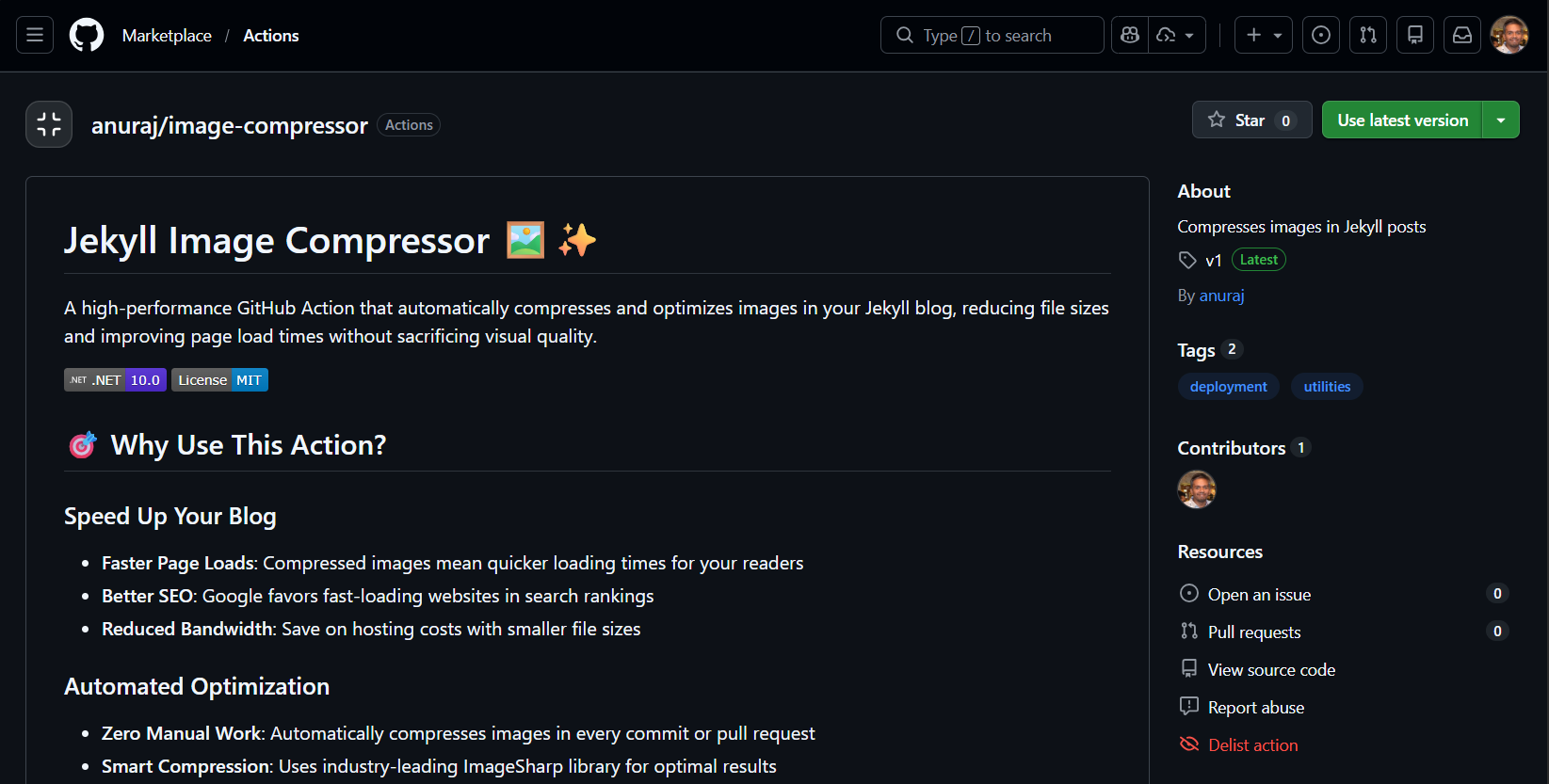
Before publishing we need to create Release for the action and then we will be able to publish it to market place. Here is the action published in the marketplace.
Now we can use it in the code like this.
name: Compress Images

on:
  push:
    paths:
      - 'assets/images/**'
  pull_request:
    paths:
      - 'assets/images/**'

jobs:
  compress:
    runs-on: ubuntu-latest
    steps:
      - uses: actions/checkout@v4

      - name: Compress Images
        uses: anuraj/image-compressor@v1
        with:
          images-path: 'assets/images'
          quality: 85
          max-width: 1920
If we want to test it GitHub Actions before publishing it to Market place. We can do this by creating a directory like this actions/image-compressor under the .github directory. Then in the root image-compressor directory, we need to keep the action.yml file and then the src folder as well. In the workflow file we need to update like this. It is the actual GitHub actions file which is building my blog.
name: Build Jekyll site with Image Compression

on:
  push:
    branches: ["main"]

permissions:
  contents: write  # Changed from 'read' to 'write' to allow committing compressed images
  pages: write
  id-token: write

jobs:
  build:
    runs-on: ubuntu-latest
    steps:
      - name: Checkout
        uses: actions/checkout@v4
        with:
          fetch-depth: 0  # Added: needed to detect changed files

      # NEW: Detect if any images were added/modified
      - name: Detect new images
        id: detect-images
        run: |
          if git diff --name-only HEAD^ HEAD | grep -E '\.(jpg|jpeg|png)$'; then
            echo "has-images=true" >> $GITHUB_OUTPUT
          else
            echo "has-images=false" >> $GITHUB_OUTPUT
          fi

      # NEW: Compress images if detected
      - name: Compress Images
        if: steps.detect-images.outputs.has-images == 'true'
        uses: ./.github/actions/image-compressor
        with:
          images-path: 'assets/images'  # Update this to match your images folder
          quality: 85
          max-width: 1920

      # NEW: Commit compressed images back to repo
      - name: Commit compressed images
        if: steps.detect-images.outputs.has-images == 'true'
        run: |
          git config --global user.name 'github-actions[bot]'
          git config --global user.email 'github-actions[bot]@users.noreply.github.com'
          git add assets/images/
          git diff --quiet && git diff --staged --quiet || git commit -m "chore: compress images [skip ci]"
          git push

      # Your existing steps continue below
      - name: Setup Pages
        uses: actions/configure-pages@v5

      - name: Build
        uses: actions/jekyll-build-pages@v1

      - name: Upload artifact
        uses: actions/upload-pages-artifact@v3

  deploy:
    runs-on: ubuntu-latest
    needs: build
    steps:
      - name: Deploy to GitHub Pages
        id: deployment
        uses: actions/deploy-pages@v4
    environment:
      name: github-pages
      url: $
I uploaded the source code here - https://github.com/anuraj/image-compressor - This implementation is little different from the source code. Now it is optimized to use compress only the changed files, instead of compressing all the files.
Building a custom GitHub Action in C# gives you complete control over your image optimization pipeline while leveraging the power and familiarity of the .NET ecosystem. This solution has been running smoothly on my Jekyll blog, automatically optimizing images and improving page load times.
Happy Programming.
If you find my content helpful, consider supporting my work. Your support helps me continue creating valuable resources for the community.

Found this useful? Share it with your network!
Copyright © 2026 Anuraj. Blog content licensed under the Creative Commons CC BY 2.5 | Unless otherwise stated or granted, code samples licensed under the MIT license. This is a personal blog. The opinions expressed here represent my own and not those of my employer. Powered by Jekyll. Hosted with ❤ by GitHub