Building AWS lambda functions powered by ASP.NET Core Minimal APIs
December 16, 2025 by Anuraj
dotnet webapi aws
In this blog post, we’ll learn how to build ASP.NET Core Minimal APIs as Lambda functions and deploy it to AWS. We can build Lambda functions using ASP.NET Core using the AWS Lambda CLI and AWS Project templates. In this blog post we will learn how to create a ASP.NET Core Minimal API, enable Lambda support.
I am creating a web api using the command - dotnet new webapi --name MinimalApi - by default it will be Minimal API. Once we created the project, we can add reference of Amazon.Lambda.AspNetCoreServer.Hosting nuget package - this package will help use AddAWSLambdaHosting extension method which will setup the Amazon.Lambda.AspNetCoreServer package to process the incoming Lambda events as ASP.NET Core requests. It will also initialize Amazon.Lambda.RuntimeSupport package to interact with the Lambda service.
I removed the weatherforecast endpoint and associated records, next we need to modify the Program.cs file and include this - builder.Services.AddAWSLambdaHosting(LambdaEventSource.HttpApi); - here is the modified file.
var builder = WebApplication.CreateBuilder(args);

// Add services to the container.
// Learn more about configuring OpenAPI at https://aka.ms/aspnet/openapi
builder.Services.AddOpenApi();

// Add support for AWS Lambda hosting
builder.Services.AddAWSLambdaHosting(LambdaEventSource.HttpApi);

var app = builder.Build();

// Configure the HTTP request pipeline.
if (app.Environment.IsDevelopment())
{
    app.MapOpenApi();
}

app.MapGet("/", () => "Hello World!");

app.Run();
I am using LambdaEventSource.HttpApi - other possible options are API Gateway REST (LambdaEventSource.RestApi) or an Application Load Balancer (LambdaEventSource.ApplicationLoadBalancer).
Next we can add a file which contains various configuration options for the Lambda - aws-lambda-tools-defaults.json
{
  "Information": "This file contains default values for the AWS Lambda .NET CLI commands.",
  "profile": "default",
  "region": "us-east-1",
  "configuration": "Release",
  "function-architecture": "x86_64",
  "function-runtime": "dotnet10",
  "function-memory-size": 512,
  "function-timeout": 30,
  "function-handler": "MinimalApi",
  "function-url-enable": true
}
In this file, the function-handler value should be the assembly name, function-runtime is the .NET runtime we need to use, I am using the latest .NET 10. The function-url-enable configuration helps to enable a URL for the deployed function and returns it. If this is not configured, we have to enable this in the AWS Console and get the URL.
Now we are ready to deploy the Lambda function to AWS. To deploy we need the AWS Lambda Tools. It is available as dotnet tool which we can install by running this command - dotnet tool install -g Amazon.Lambda.Tools. Once installed, we can execute the command dotnet lambda deploy-function, which will prompt for few details and we can provide the values and get the deployed URL, which we can use to verify whether the deployment was successful or not.
Here is the output of the deployment command.
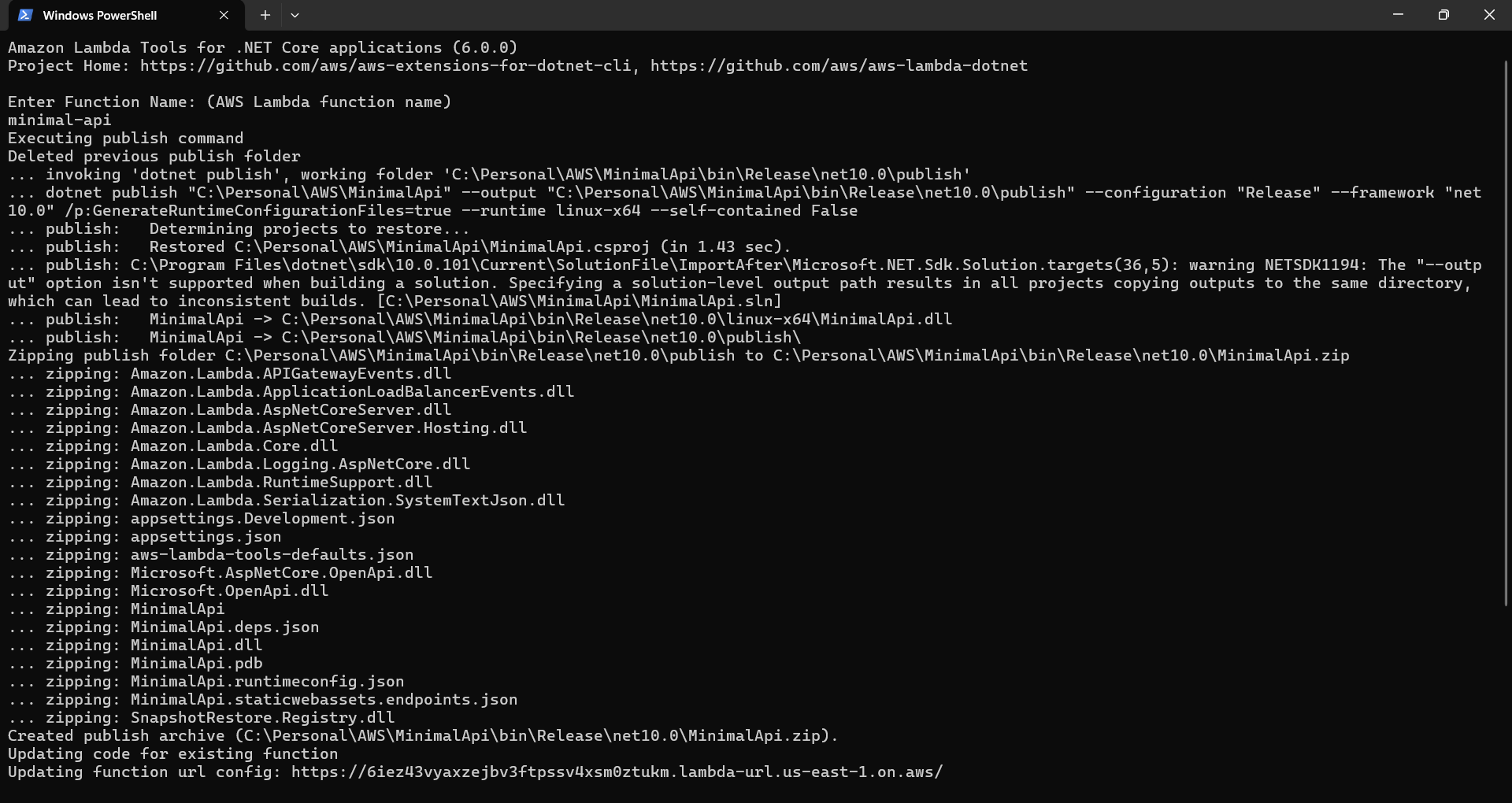
This will prompt for the name of the Lambda function, then it will ask for IAM Role. Since I already deployed, it is giving me an option to select existing one or create new one. If I select, create new option, it will prompt for permissions - where we need to select the AWSLambdaBasicExecutionRole permission - it is coming as 6th option. After completing all these, it will deploy the function and return the URL.
In this way we can deploy ASP.NET Core Minimal API as AWS Lambda function. Since AWS supports latest .NET version, I used .NET 10 for this.
Happy Programming.
If you find my content helpful, consider supporting my work. Your support helps me continue creating valuable resources for the community.

Found this useful? Share it with your network!
Copyright © 2026 Anuraj. Blog content licensed under the Creative Commons CC BY 2.5 | Unless otherwise stated or granted, code samples licensed under the MIT license. This is a personal blog. The opinions expressed here represent my own and not those of my employer. Powered by Jekyll. Hosted with ❤ by GitHub