Build a .NET AI vector search app
December 12, 2025 by Anuraj
dotnet aspnetcore sqlserver rag efcore
In this blog post, we’ll build a .NET console application that performs semantic search using SQL Server 2025 as a vector store. We’ll also learn how to generate embeddings from user queries and leverage those embeddings to retrieve the most relevant results directly from SQL Server 2025.
First we will create a Console application - I am using the following command dotnet new console -o VectorDataAI.
As I am using dependency injection and EF Core, I am adding following nuget packages.
dotnet add package Microsoft.Extensions.Hosting
dotnet add package Microsoft.EntityFrameworkCore.SqlServer
dotnet add package Microsoft.EntityFrameworkCore.Design
Then I am creating the Database context and Model classes. Here is the model class I am using.
public class CloudService
{
    public int Id { get; set; }
    public string? Name { get; set; }
    public string? Description { get; set; }
    [Column(TypeName = "vector(384)")]
    public SqlVector<float> Vector { get; set; }
}
And here is the DbContext.
public class VectorDataAIDbContext : DbContext
{
    public VectorDataAIDbContext(DbContextOptions options)
        : base(options)
    {
    }

    protected VectorDataAIDbContext()
    {
    }

    public DbSet<CloudService> CloudServices { get; set; }
}
Next we will wire up the dependency injection and configuration services, like this.
var services = new ServiceCollection();

var configuration = new ConfigurationBuilder()
    .SetBasePath(Directory.GetCurrentDirectory())
    .AddJsonFile("appsettings.json", optional: false, reloadOnChange: true)
    .Build();

services.AddDbContext<VectorDataAIDbContext>(options =>
{
    var connectionString = configuration.GetConnectionString("VectorDataAIDbConnection");
    options.UseSqlServer(connectionString, sqlOptions =>
    {
        sqlOptions.EnableRetryOnFailure();
    });
});
Now we can seed the database. For seeding the database we need any embedding supported LLM. For this blog post, I am using Ollama. So I need to add OllamaSharp package.
var ollamaApiClient = new OllamaApiClient("http://localhost:11434", "all-minilm");
services.AddSingleton(ollamaApiClient);

var provider = services.BuildServiceProvider();

List<CloudService> cloudServices =
[
    new() {
        Name = "Azure App Service",
        Description = "Host .NET, Java, Node.js, and Python web applications and APIs in a fully managed Azure service. You only need to deploy your code to Azure. Azure takes care of all the infrastructure management like high availability, load balancing, and autoscaling."
    },
    //Other Azure Services with Name and Description.
];

var dbContext = provider.GetRequiredService<VectorDataAIDbContext>();
if (!dbContext.CloudServices.Any())
{
    var embeddingGenerator = provider.GetRequiredService<OllamaApiClient>();
    foreach (var service in cloudServices)
    {
        var embedding = await embeddingGenerator.EmbedAsync(service.Description!);
        service.Vector = new SqlVector<float>(embedding.Embeddings[0].ToArray());
        dbContext.CloudServices.Add(service);
    }
    await dbContext.SaveChangesAsync();
}
In the above code snippet, I am looping through the Cloud Services collection, generating the embeddings and insert them to the database - if no records exists in the database. And then we can implement the search like this - like a general LINQ query.
Console.WriteLine("Enter your question about Azure cloud services:");
var question =  Console.ReadLine();

var questionEmbedding = await ollamaApiClient.EmbedAsync(question!);
var questionVector = new SqlVector<float>(questionEmbedding.Embeddings[0].ToArray());
var topSimilarServices = dbContext.CloudServices
    .OrderBy(b => EF.Functions.VectorDistance("cosine", b.Vector, questionVector))
    .Take(2)
    .ToListAsync();

if (topSimilarServices.Result.Count == 0)
{
    Console.WriteLine("No similar cloud services found.");
}
else
{
    Console.WriteLine("Top similar cloud services:");
    foreach (var service in topSimilarServices.Result)
    {
        Console.WriteLine($"- {service.Name}: {service.Description}");
    }
}
Now we can enhance the application with Chat client. I am adding one more chat client for interacting with LLM. I am using Phi4 LLM.
var ollamaApiEmbedClient = new OllamaApiClient("http://localhost:11434", "all-minilm");
services.AddKeyedSingleton("EmbeddingService", ollamaApiEmbedClient);
var ollamaApiChatClient = new OllamaApiClient("http://localhost:11434", "phi4-mini:latest");
services.AddKeyedSingleton("ChatService", ollamaApiChatClient);
Then I am using the following code to interact with LLM.
Console.WriteLine("Enter your question about Azure cloud services:");
var question = Console.ReadLine();

var questionEmbedding = await ollamaApiEmbedClient.EmbedAsync(question!);
var questionVector = new SqlVector<float>(questionEmbedding.Embeddings[0].ToArray());
var topSimilarServices = dbContext.CloudServices
    .OrderBy(b => EF.Functions.VectorDistance("cosine", b.Vector, questionVector))
    .Take(2)
    .ToListAsync();

var chatPrompt = "You are an expert Azure cloud solutions architect. Based on the following Azure cloud services, answer the question asked by the user.";
if (topSimilarServices.Result.Count != 0)
{
    chatPrompt += "\nHere are some Azure cloud services that might be relevant:\n";
    foreach (var service in topSimilarServices.Result)
    {
        chatPrompt += $"Service Name: {service.Name}\nDescription: {service.Description}\n\n";
    }
}

chatPrompt += $"\nUser Question: {question}\nProvide a detailed answer with recommendations.";

var chatResponse = await ollamaApiChatClient.GetResponseAsync(chatPrompt);
Console.WriteLine("\nAnswer:\n");
Console.WriteLine(chatResponse.Text);
Here is the screenshot of the application running.
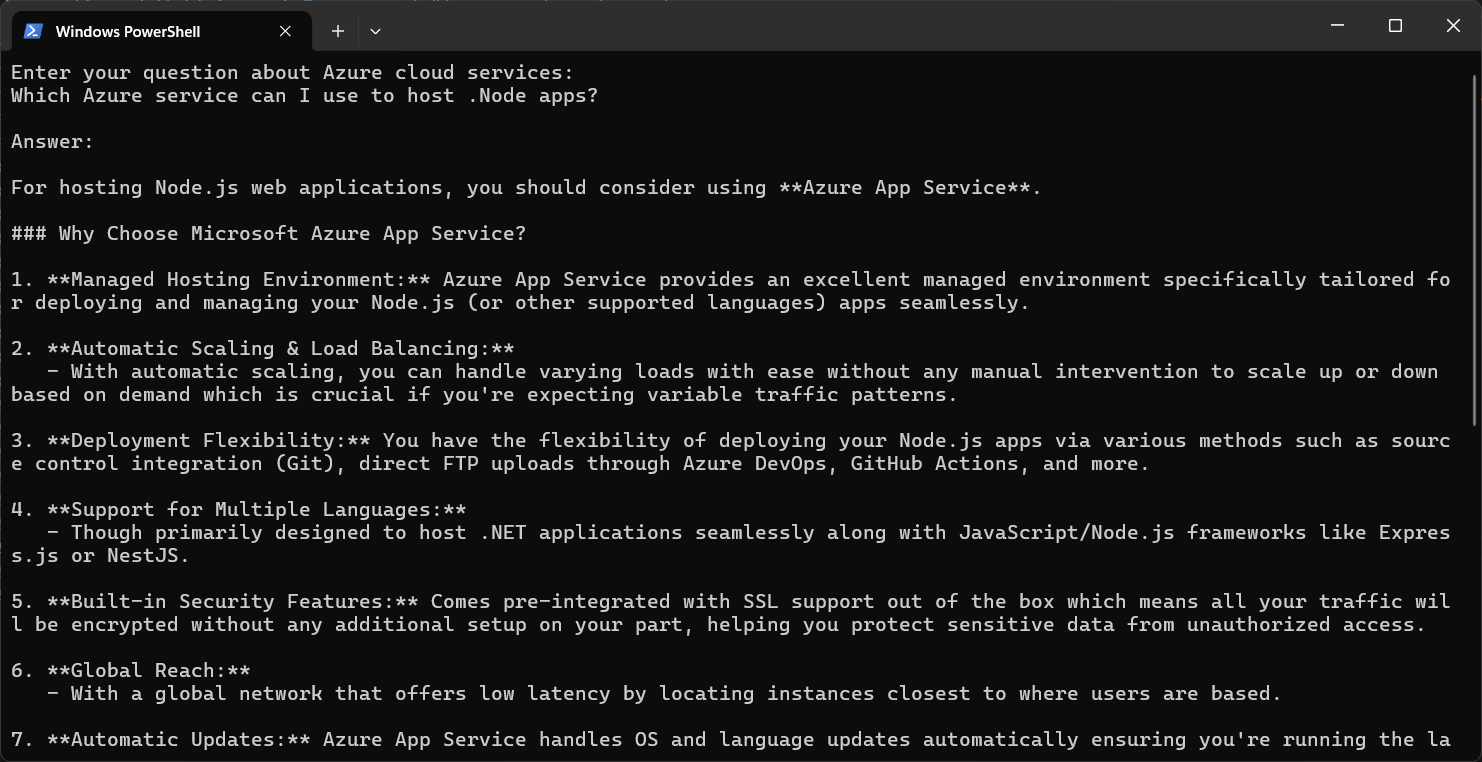
This way we can implement a simple RAG application using Ollama and SQL Server 2025. In this application we will be using dependency injection in console application. We can use the similar code in ASP.NET Core API apps as well.
Happy Programming.
If you find my content helpful, consider supporting my work. Your support helps me continue creating valuable resources for the community.

Found this useful? Share it with your network!
Copyright © 2026 Anuraj. Blog content licensed under the Creative Commons CC BY 2.5 | Unless otherwise stated or granted, code samples licensed under the MIT license. This is a personal blog. The opinions expressed here represent my own and not those of my employer. Powered by Jekyll. Hosted with ❤ by GitHub