Creating a Sales Copilot - Working with Office documents
March 07, 2026 by Anuraj
dotnet AI
In this blog post, we will learn about creating a Sales Copilot - which helps Sales people to answer questions about various documents - In this part we will explore how to work with office documents - mainly word documents and powerpoint presentations.
To read the office documents (Microsoft Word documents and Microsoft Powerpoint presentations) we will be using Open XML SDK library. We can use it for reading Microsoft Excel files as well, but for this demo, I am not reading excel files. I will be adding two classes - WordReader and PowerPointReader both these classes using Open XML library.
Here is the implementation of WordReader class.
internal sealed class WordReader : IngestionDocumentReader
{
    public override Task<IngestionDocument> ReadAsync(Stream source, string identifier,
        string mediaType, CancellationToken cancellationToken = default)
    {
        using WordprocessingDocument wordDoc = WordprocessingDocument.Open(source, false);
        var body = wordDoc.MainDocumentPart!.Document!.Body;
        var document = new IngestionDocument(identifier);
        if (body == null)
        {
            return Task.FromResult(document);
        }

        var paragraphs = body.Descendants<Paragraph>();

        if (paragraphs != null)
        {
            foreach (var paragraph in paragraphs)
            {
                if (!string.IsNullOrWhiteSpace(paragraph.InnerText))
                {
                    document.Sections.Add(new IngestionDocumentSection
                    {
                        Elements =
                        {
                            new IngestionDocumentParagraph(paragraph.InnerText)
                            {
                                Text = paragraph.InnerText
                            }
                        }
                    });
                }
            }
        }

        return Task.FromResult(document);
    }
}
And here is the implementation of PowerPointReader class.
internal sealed class PowerPointReader : IngestionDocumentReader
{
    public override Task<IngestionDocument> ReadAsync(Stream source, string identifier,
        string mediaType, CancellationToken cancellationToken = default)
    {
        using PresentationDocument pptDoc = PresentationDocument.Open(source, false);
        var presentationPart = pptDoc.PresentationPart;
        var document = new IngestionDocument(identifier);

        if (presentationPart == null)
        {
            return Task.FromResult(document);
        }

        var slideParts = presentationPart.SlideParts;

        foreach (var slidePart in slideParts)
        {
            var slide = slidePart.Slide;
            if(slide == null)
            {
                continue;
            }

            var paragraphs = slide.Descendants<Paragraph>();

            foreach (var paragraph in paragraphs)
            {
                if (!string.IsNullOrWhiteSpace(paragraph.InnerText))
                {
                    document.Sections.Add(new IngestionDocumentSection
                    {
                        Elements =
                        {
                            new IngestionDocumentParagraph(paragraph.InnerText)
                            {
                                Text = paragraph.InnerText
                            }
                        }
                    });
                }
            }
        }

        return Task.FromResult(document);
    }
}
Both these classes added under the Web App project, Services > Ingestion folder.
Next we need to configure these services to the DocumentReader.cs file. We need to modify the ReadAsync method, like this.
private readonly MarkdownReader _markdownReader = new();
private readonly MarkItDownMcpReader _pdfReader = new(mcpServerUri: GetMarkItDownMcpServerUrl());
private readonly WordReader _wordReader = new();
private readonly PowerPointReader _powerPointReader = new();
public override Task<IngestionDocument> ReadAsync(Stream source, string identifier,
    string mediaType, CancellationToken cancellationToken = default)
=> mediaType switch
{
    "application/pdf" => _pdfReader.ReadAsync(source, identifier, mediaType, cancellationToken),
    "text/markdown" => _markdownReader.ReadAsync(source, identifier, mediaType, cancellationToken),
    "application/vnd.openxmlformats-officedocument.wordprocessingml.document" =>
        _wordReader.ReadAsync(source, identifier, mediaType, cancellationToken),
    "application/vnd.openxmlformats-officedocument.presentationml.presentation" =>
        _powerPointReader.ReadAsync(source, identifier, mediaType, cancellationToken),
    _ => throw new InvalidOperationException($"Unsupported media type '{mediaType}'"),
};
In the above code, we will be looking into the media type - document and presentation, and based on the media type, we will be using WordReader and PowerPointReader classes.
We will be modifying one more code - currently it is looking for files under Data folder in wwwroot, we will be modifying this code to search for files under all the directories inside the specific folder, like this. This change is in DataIngestor class.
public async Task IngestDataAsync(DirectoryInfo directory, string searchPattern)
{
    using var writer = new VectorStoreWriter<string>(vectorStore, dimensionCount: IngestedChunk.VectorDimensions, new()
    {
        CollectionName = IngestedChunk.CollectionName,
        DistanceFunction = IngestedChunk.VectorDistanceFunction,
        IncrementalIngestion = false,
    });

    using var pipeline = new IngestionPipeline<string>(
        reader: new DocumentReader(directory),
        chunker: new SemanticSimilarityChunker(embeddingGenerator, new(TiktokenTokenizer.CreateForModel("gpt-4o"))),
        writer: writer,
        loggerFactory: loggerFactory);

    await foreach (var result in pipeline.ProcessAsync(directory, searchPattern, SearchOption.AllDirectories))
    {
        logger.LogInformation("Completed processing '{id}'. Succeeded: '{succeeded}'.", result.DocumentId, result.Succeeded);
    }
}
Here is the console log - ingestion of the word document and power point presentation.
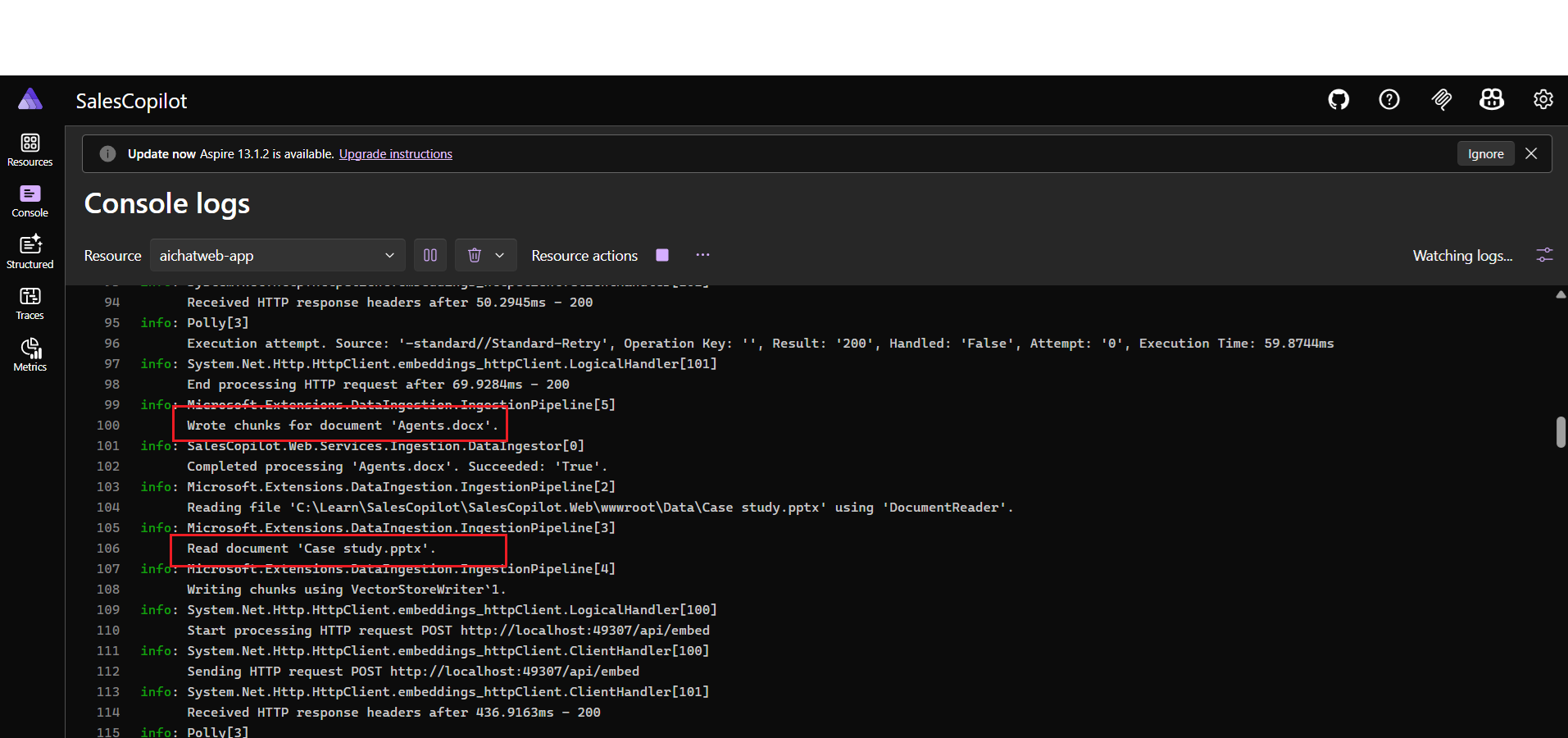
This way we can extend the chat web application to use Microsoft word documents and Microsoft Powerpoint presentations. Next we will update the solution to use PDF Reader instead of the MCP Tool - because the MCP tool fails for the big files.
Happy Programming
If you find my content helpful, consider supporting my work. Your support helps me continue creating valuable resources for the community.

Found this useful? Share it with your network!
Copyright © 2026 Anuraj. Blog content licensed under the Creative Commons CC BY 2.5 | Unless otherwise stated or granted, code samples licensed under the MIT license. This is a personal blog. The opinions expressed here represent my own and not those of my employer. Powered by Jekyll. Hosted with ❤ by GitHub