Create a CRUD HTTP API with Lambda and DynamoDB - Part2
December 30, 2025 by Anuraj
AWS Lambda DynamoDb
In this blog post series, we’ll explore how to create a CRUD application using Http API with Lambda and DynamoDB. This is multipart blog post. In this blog post we will connect to DynamoDb from AWS Lambda.
We will be running the DynamoDb locally using Docker. We can do it using the following command.
docker run -d -p 8000:8000 `
    -v "${PWD}/dynamodb:/home/dynamodblocal/data" `
    amazon/dynamodb-local `
    -jar DynamoDBLocal.jar -sharedDb -dbPath /home/dynamodblocal/data
Next using AWS CLI we need to create a Table. To do this we can use the following command.
aws dynamodb create-table --table-name TodoItems `
    --attribute-definitions AttributeName=Id,AttributeType=S `
    --key-schema AttributeName=Id,KeyType=HASH `
    --provisioned-throughput ReadCapacityUnits=5,WriteCapacityUnits=5 `
    --endpoint-url http://localhost:8000
Please make sure the --endpoint-url parameter is provided, otherwise it will try to create table in AWS.
Now we are ready with the setup, next in the Lambda project, add reference of AWSSDK.DynamoDBv2 nuget package. We can do it using dotnet add package AWSSDK.DynamoDBv2. This nuget package helps us to use POCO classes instead if using Dictionary to manage data with DynamoDb.
I am creating a class TodoItem - adding various attributes.
using Amazon.DynamoDBv2.DataModel;

namespace TodoApi
{
    [DynamoDBTable("TodoItems")]
    public class TodoItem
    {
        [DynamoDBHashKey]
        public string Id { get; set; } = Guid.NewGuid().ToString("N");
        [DynamoDBProperty]
        public string Name { get; set; } = null!;
        [DynamoDBProperty]
        public bool IsComplete { get; set; }
    }
}
The DynamoDBTable attribute will specify the table name which will be using in the DynamoDb. The DynamoDBHashKey property that marks up current member as a hash key element. Exactly one member in a class must be marked with this attribute. Members that are marked as a hash key must be convertible to a Primitive object.
Now we can modify the Function.cs class. In the constructor I am creating instance of AmazonDynamoDBClient and DynamoDBContext objects - which will be used to interact with DynamoDb similar to EF Core DbContext.
private static readonly RegionEndpoint region = RegionEndpoint.USEast1;
private readonly IDynamoDBContext? _dbContext;

public Function()
{
    var config = new AmazonDynamoDBConfig
    {
        RegionEndpoint = region,
        ServiceURL = Environment.GetEnvironmentVariable("DYNAMODB_URL")
            ?? "http://localhost:8000"
    };

    var client = new AmazonDynamoDBClient(config);
    _dbContext = new DynamoDBContextBuilder()
                .WithDynamoDBClient(() => client)
                .Build();
}
And here is the implementation of FunctionHandler method
public async Task<APIGatewayHttpApiV2ProxyResponse> FunctionHandler
    (APIGatewayHttpApiV2ProxyRequest request, ILambdaContext context)
{
    var method = request.RequestContext.Http.Method;
    return method switch
    {
        "POST" => await AddItems(request),
        "GET" => await GetItems(request),
        "PUT" => await UpdateItems(request),
        "DELETE" => await DeleteItems(request),
        _ => new() { StatusCode = 405 }
    };
}
In this method, based on the Http Method, I am invoking various internal methods. Here is the POST method implementation looks like.
private async Task<APIGatewayHttpApiV2ProxyResponse> AddItems(APIGatewayHttpApiV2ProxyRequest request)
{
    var todoItem = JsonSerializer.Deserialize<TodoItem>(request.Body!);
    await _dbContext!.SaveAsync(todoItem!);
    return new APIGatewayHttpApiV2ProxyResponse
    {
        StatusCode = 201,
        Body = "Todo Item Added",
        Headers = new Dictionary<string, string>
        {
            { "Content-Type", "application/json" }
        }
    };
}
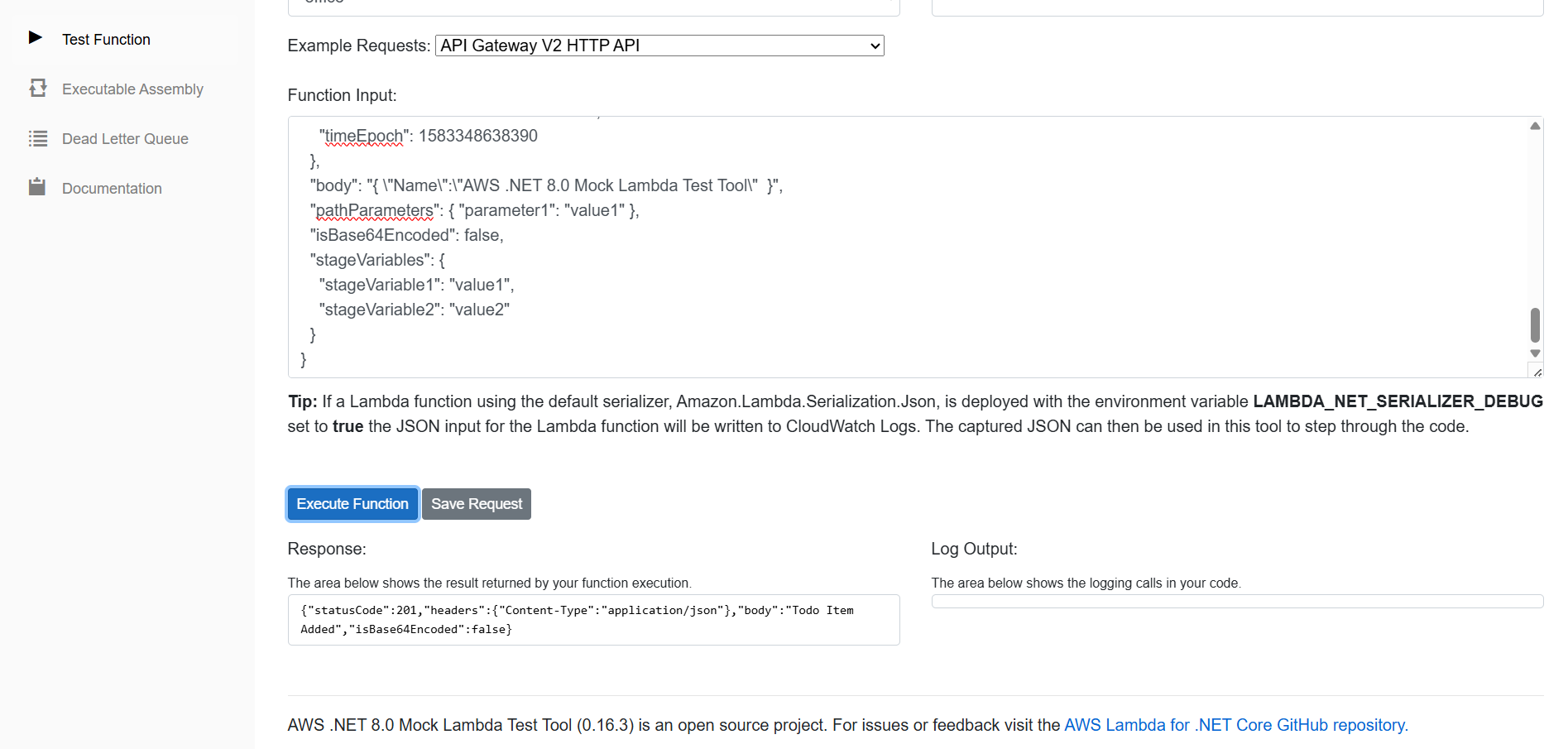
Next we can test with the Mock Testing tool using the API Gateway V2 HTTP API method, we need to modify the Body element and update it like this.
"body": "{ \"Name\":\"AWS .NET 8.0 Mock Lambda Test Tool\" }"
Only the Name property is required. Other two properties of the TodoItem class is optional. Make sure the POST method is selected. And we can click on the Execute Function to verify whether the data is getting saved in the database.
Here is the screenshot of the application with success response.
This way we implement database connectivity and performing CRUD operations with DynamoDb using C# and dotnet. In the next blog post we will fix the unit tests - which will be broken now.
Happy Programming.
If you find my content helpful, consider supporting my work. Your support helps me continue creating valuable resources for the community.

Found this useful? Share it with your network!
Copyright © 2025 Anuraj. Blog content licensed under the Creative Commons CC BY 2.5 | Unless otherwise stated or granted, code samples licensed under the MIT license. This is a personal blog. The opinions expressed here represent my own and not those of my employer. Powered by Jekyll. Hosted with ❤ by GitHub