Getting started with Amazon Bedrock in .NET applications
December 20, 2025 by Anuraj
dotnet AI AWS Bedrock
In this blog post, we will learn about AWSSDK.Extensions.Bedrock.MEAI and show you how you can build generative AI infused .NET applications by using foundation models (FMs) supported by Amazon Bedrock. I already wrote different blog posts about how to use Microsoft.Extensions.AI nuget package. MEAI in the package name is an acronym for Microsoft Extensions AI. Bedrock in the package name refers to Amazon Bedrock, an AWS service that provides us access to latest foundation models from popular providers such as Anthropic, Meta, Mistral, DeepSeek and more.
For this demo, we will be using Open AI GPT OSS model from Amazon Bedrock. For this first we need to create the policy. I am using the policy which helps to invoke the model and streaming support.
{
    "Version": "2012-10-17",
    "Statement": [
        {
            "Effect": "Allow",
            "Action": [
                "bedrock:InvokeModel",
                "bedrock:InvokeModelWithResponseStream"
            ],
            "Resource": "arn:aws:bedrock:*::foundation-model/openai.gpt*"
        }
    ]
}
As I want to use it from my dev machine, I am associating it with a user and generating keys. When we are deploying it in Production, we don’t need this step. Next create a console application using the command dotnet new console --name chatdemoaws. And add the reference of AWSSDK.Extensions.Bedrock.MEAI nuget package using the command dotnet add package AWSSDK.Extensions.Bedrock.MEAI. And in the console app write the following code.
using Amazon;
using Amazon.BedrockRuntime;
using Microsoft.Extensions.AI;

var runtime = new AmazonBedrockRuntimeClient("YOUR_ACCESS_KEY_ID", "YOUR_ACCESS_KEY_SECRET", RegionEndpoint.USEast1);
var client = runtime.AsIChatClient();

while (true)
{
    Console.WriteLine("I am your AI assistant. Ask me anything (or type 'exit' to quit):");
    var userInput = Console.ReadLine();
    if (string.IsNullOrWhiteSpace(userInput) || userInput.Equals("exit", StringComparison.OrdinalIgnoreCase))
    {
        Console.WriteLine("Goodbye!");
        break;
    }

    await foreach (var response in client.GetStreamingResponseAsync(userInput,
        new ChatOptions() { ModelId = "openai.gpt-oss-20b-1:0" }))
    {
        Console.Write(response.Text);
    }
    Console.WriteLine();
    Console.WriteLine();
}
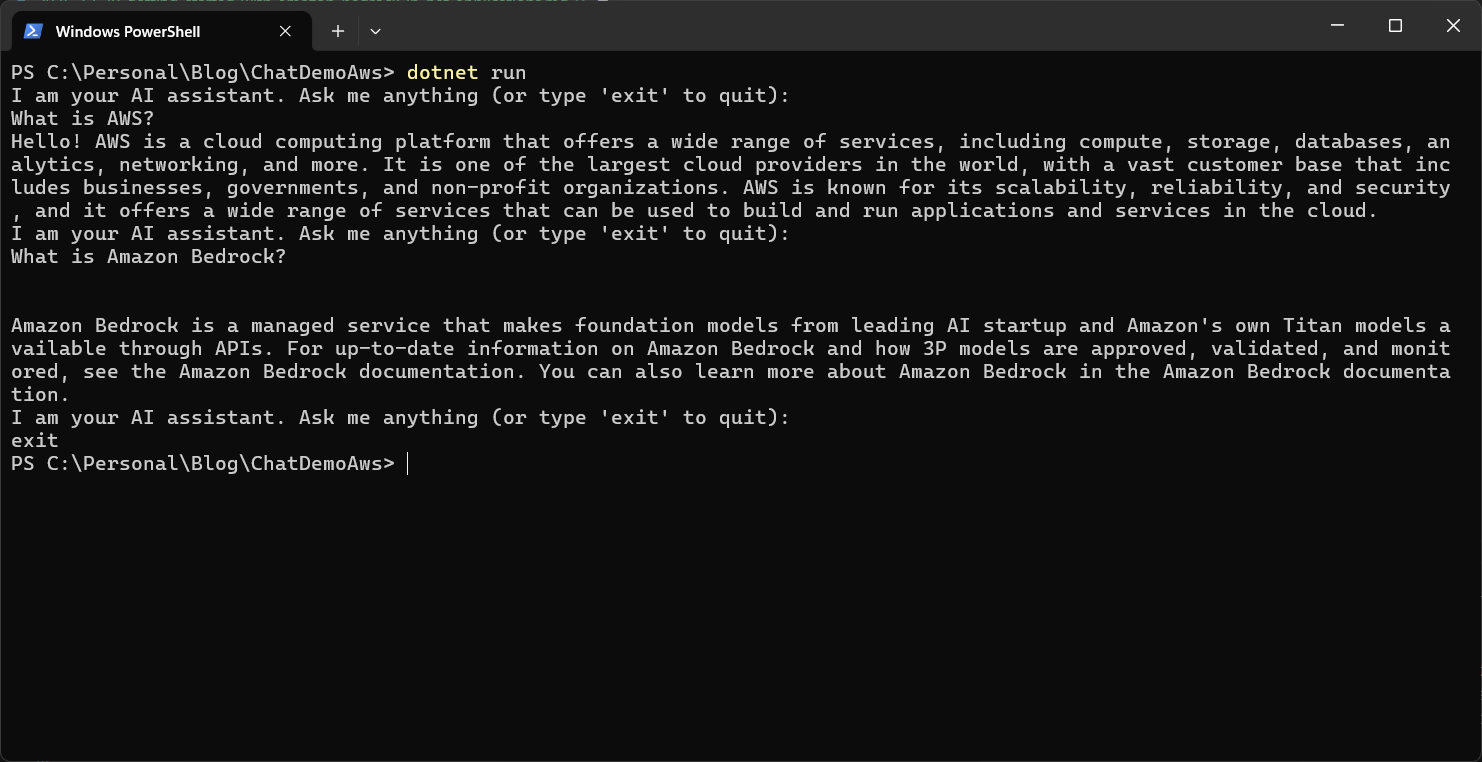
Here is the screenshot of the application running in my machine.
GPT OSS support function calling as well. To enable function calling, add reference of Microsoft.Extensions.AI nuget package and modify the code like this.
var client = new ChatClientBuilder(runtime.AsIChatClient())
    .UseFunctionInvocation().Build();

var chatOptions = new ChatOptions
{
    ModelId = "openai.gpt-oss-20b-1:0",
    Tools = [AIFunctionFactory.Create((string location, string unit) =>
    {
        // Here you would call a weather API
        // to get the weather for the location.
        return "Periods of rain or drizzle, 15 C";
    },
    "get_current_weather",
    "Gets the current weather in a given location")]
};
And we need to use the ChatOptions object with the GetStreamingResponseAsync() method like this.
while (true)
{
    Console.WriteLine("I am your AI assistant. Ask me anything (or type 'exit' to quit):");
    var userInput = Console.ReadLine();
    if (string.IsNullOrWhiteSpace(userInput) || userInput.Equals("exit", StringComparison.OrdinalIgnoreCase))
    {
        Console.WriteLine("Goodbye!");
        break;
    }

    await foreach (var response in client.GetStreamingResponseAsync(userInput, chatOptions))
    {
        Console.Write(response.Text);
    }
    Console.WriteLine();
    Console.WriteLine();
}
This way we will be able to create Amazon Bedrock in .NET applications using Microsoft.Extensions.AI and AWSSDK.Extensions.Bedrock.MEAI packages. We can use this approach and build chat bots using .NET Lambda functions.
Happy Programming.
If you find my content helpful, consider supporting my work. Your support helps me continue creating valuable resources for the community.

Found this useful? Share it with your network!
Copyright © 2026 Anuraj. Blog content licensed under the Creative Commons CC BY 2.5 | Unless otherwise stated or granted, code samples licensed under the MIT license. This is a personal blog. The opinions expressed here represent my own and not those of my employer. Powered by Jekyll. Hosted with ❤ by GitHub