Getting started with AWS CDK in C#
January 02, 2026 by Anuraj
AWS Lambda DevOps
In this blog post we will learn how to get started with AWS CDK in C#. The AWS Cloud Development Kit (AWS CDK) is an open-source software development framework for defining cloud infrastructure in code and provisioning it through AWS CloudFormation. To use CDK, we need to Node installed on the machine. First we will be installing the AWS CDK CLI, we can use the following command npm install -g aws-cdk. We can verify version of CDK by running the command cdk --version once the installation is completed.
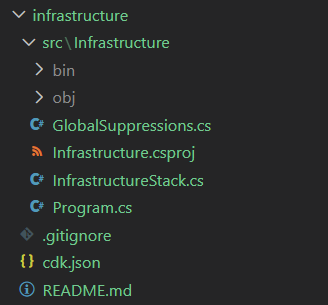
In the current project I am creating a folder with the name Infrastructure, then I am running the command cdk init app --language csharp - this will create a blank project for CDK development with C#. It will create a cdk.json which helps the CDK Toolkit how to execute your app. Here is the directory structure of the project created by the command.
Before getting into the code, here are the main concepts of AWS CDK.
- Construct: The basic building block in CDK, representing a piece of infrastructure (e.g., an S3 bucket or a Lambda function).
- Stack: A collection of constructs grouped, defining a deployable infrastructure unit. It maps directly to an AWS CloudFormation stack.
- App: The entry point of your CDK application. It contains one or more stacks and manages their lifecycle during deployment.
We will be using these concepts to build and deploy application infrastructure easily.
So in the CRUD application, we will be using AWS Lambda and DynamoDB database. So we need to define AWS Lambda and DynamoDB in the InfrastructureStack class. Once we initialized, we will get the following code.
namespace Infrastructure
{
    public class InfrastructureStack : Stack
    {
        internal InfrastructureStack(Construct scope, string id, IStackProps props = null)
            : base(scope, id, props)
        {
            // The code that defines your stack goes here
        }
    }
}
To set up the AWS Lambda Function, we can use the Function class and provide required properties to be set on the Lambda Function. Here is the example.
internal InfrastructureStack(Construct scope, string id, IStackProps props = null)
    : base(scope, id, props)
{
    var todoApiLambda = new Function(this, "TodoApi", new FunctionProps()
    {
        FunctionName = "TodoApi",
        Runtime = Runtime.DOTNET_8,
        Handler = "TodoApi::TodoApi.Function::FunctionHandler",
        MemorySize = 512,
        Code = Code.FromAsset(@"../../src/TodoApi/bin/Release/net8.0/publish"),
        Timeout = Duration.Seconds(30)
    });
}
We need to publish the Lambda using dotnet publish command. Similarly we can add or configure Dynamodb as well, like this. This code creates a table, specifies it’s name and the PartitionKey attribute.
var todoItemsTable = new Table(this, "TodoItems", new TableProps()
{
    TableName = "TodoItems",
    PartitionKey = new Attribute()
    {
        Name = "Id",
        Type = AttributeType.STRING,
    },
    RemovalPolicy = RemovalPolicy.DESTROY
});
If we use CDK, we don’t need to manually create the table using AWS CLI like we used in the earlier blog post. Using CDK we will be able configure permissions as well, for example, we want to configure this lambda to read and write only we can do it like this.
todoItemsTable.GrantReadWriteData(todoApiLambda);
We can deploy this to AWS by running the command cdk bootstrap and then cdk deploy. The cdk bootstrap command prepares our AWS environment for deploying CDK applications. It will be creating a AWS S3 bucket and resources, and copy the resources required to deploy the application. Once the cdk bootstrap command executed, next we can run the cdk deploy command, which will deploy the resources to AWS.
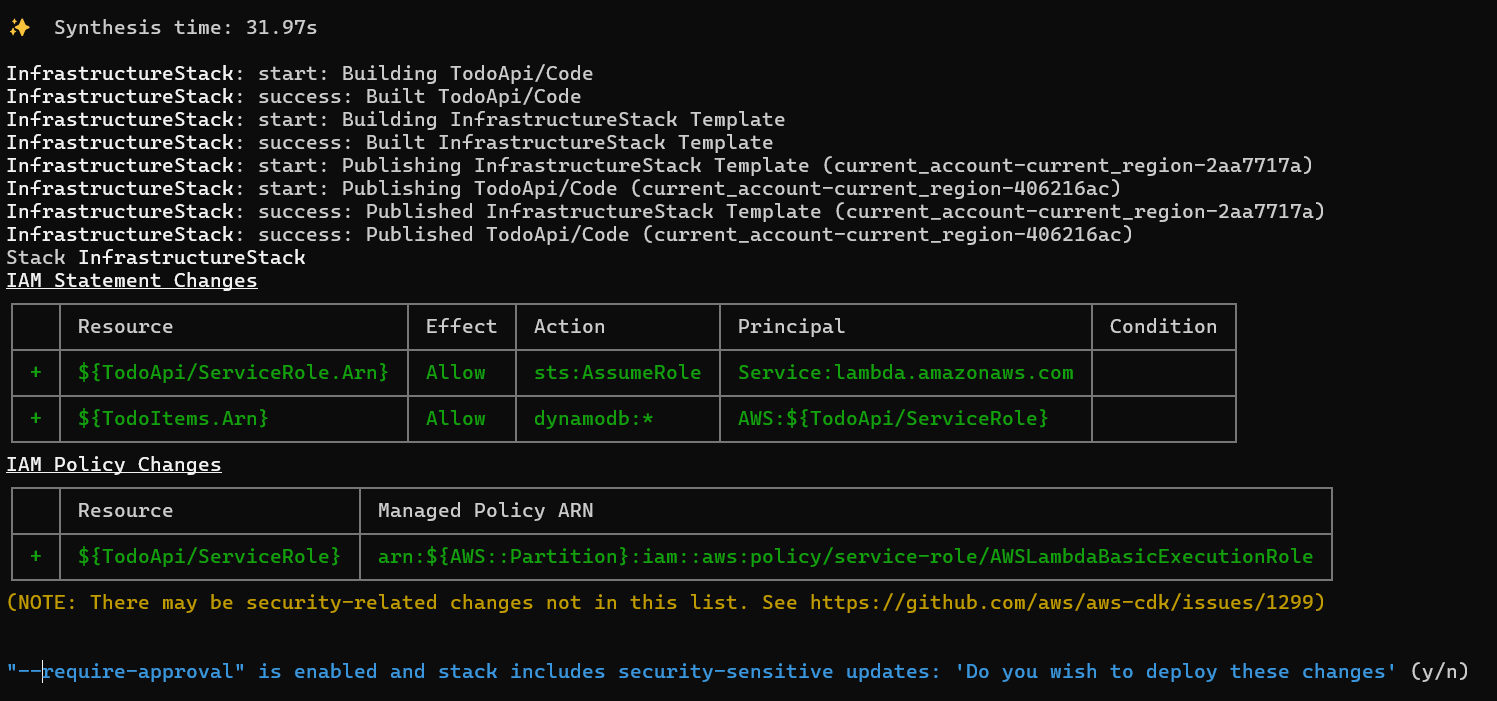
Since I am deploying the resources to AWS, I need to give explicit permission to deploy resources. We will be able to see the deployment in AWS Console under CloudFormations.
And to remove the resources, we can provide the cdk destroy which will remove the resources. For this demo, I wrote everything in one class, but for real projects we may have to create different constructs and stacks. In one of my projects, I had to create two stacks - one for ApiGateway, Lambda, and Dynamodb resources - which will return the ApiGateway endpoint which I will be using in the CI Build to build my react app, then the second stack which will deploy the S3 resources with latest react build outputs.
Happy Programming.
If you find my content helpful, consider supporting my work. Your support helps me continue creating valuable resources for the community.

Found this useful? Share it with your network!
Copyright © 2026 Anuraj. Blog content licensed under the Creative Commons CC BY 2.5 | Unless otherwise stated or granted, code samples licensed under the MIT license. This is a personal blog. The opinions expressed here represent my own and not those of my employer. Powered by Jekyll. Hosted with ❤ by GitHub