How to work with custom containers in .NET Aspire
February 04, 2026 by Anuraj
Aspire AWS C# Docker
In this blog post,we will learn how to add custom containers to the .NET Aspire. Few days back I wrote a blog post on integrating .NET Aspire to AWS. As part of this AWS Dynamodb supported .NET Aspire. But I couldn’t find an admin interface to manage AWS Dynamodb locally. So I created a docker image for DynamoDb Admin.
Here is the docker file.
# Use alpine node base image
FROM node:25-alpine

# Set default environment variable
ENV DYNAMODB_ENDPOINT=http://host.docker.internal:8000

RUN npm install -g dynamodb-admin

CMD ["sh", "-c", "dynamodb-admin --host 0.0.0.0 --port 8001 --dynamo-endpoint ${DYNAMODB_ENDPOINT}"]
Now we can build the docker image using docker build -t anuraj/dynamodb-admin . - this command will build a docker image with Dynamo DB Admin.
When we are running the Dynamodb locally, we can run this docker image, connect and manage to dynamodb instance from this. Next we will integrate it as container in .NET Aspire. To do this we can do something like this.
builder.AddContainer("dynamodb-admin", "anuraj/dynamodb-admin")
    .WithHttpEndpoint(targetPort: 8001, name: "http")
    .WithEnvironment(context =>
    {
        var dynamoEndpoint = dynamodb.GetEndpoint("http");
        context.EnvironmentVariables["DYNAMODB_ENDPOINT"] = dynamoEndpoint;
    })
    .WaitFor(dynamodb);
In this we will be getting the http endpoint from DynamoDB and setting it as the DYNAMODB_ENDPOINT environment variable for our container. We can make it reusable by creating an extension method - which we can reuse. Here is the extension method.
I am writing the code in the AppHost.cs file.
public static class DynamoDbBuilderExtensions
{
    /// <summary>
    /// Adds a DynamoDB Admin container to the application model for managing DynamoDB tables.
    /// This admin interface will be connected to the specified DynamoDB Local resource.
    /// </summary>
    /// <param name="builder">The DynamoDB Local resource builder.</param>
    /// <param name="configureContainer">Optional callback to configure the DynamoDB Admin container resource.</param>
    /// <param name="containerName">The name of the container (Optional). Defaults to "{dynamodb-name}-admin".</param>
    /// <returns>A reference to the <see cref="IResourceBuilder{T}"/>.</returns>
    public static IResourceBuilder<T> WithDynamoDbAdmin<T>(
    this IResourceBuilder<T> builder,
    Action<IResourceBuilder<ContainerResource>>? configureContainer = null,
    string? containerName = null,
    string endpointName = "http")
    where T : ContainerResource
    {
        ArgumentNullException.ThrowIfNull(builder);

        containerName ??= $"{builder.Resource.Name}-admin";

        var adminContainer = builder.ApplicationBuilder.AddContainer(containerName, "anuraj/dynamodb-admin")
            .WithHttpEndpoint(targetPort: 8001, name: "http")
            .WithEnvironment(context =>
            {
                var dynamoEndpoint = builder.Resource.GetEndpoint(endpointName);

                context.EnvironmentVariables["DYNAMODB_ENDPOINT"] =
                    $"http://{builder.Resource.Name}:{dynamoEndpoint.TargetPort}";
            })
            .WaitFor(builder);

        configureContainer?.Invoke(adminContainer);

        return builder;
    }
}
The code is simple and straight forward, I am just wrapped the custom container integration to an extension method. Now we can use this code like this in the AppHost.cs file.
var builder = DistributedApplication.CreateBuilder(args);

builder.AddAWSDynamoDBLocal("DynamoDb")
    .WithDynamoDbAdmin();

builder.Build().Run();
Here is an example of the .NET Aspire running in my machine with DynamoDB and DynamoDB admin locally.
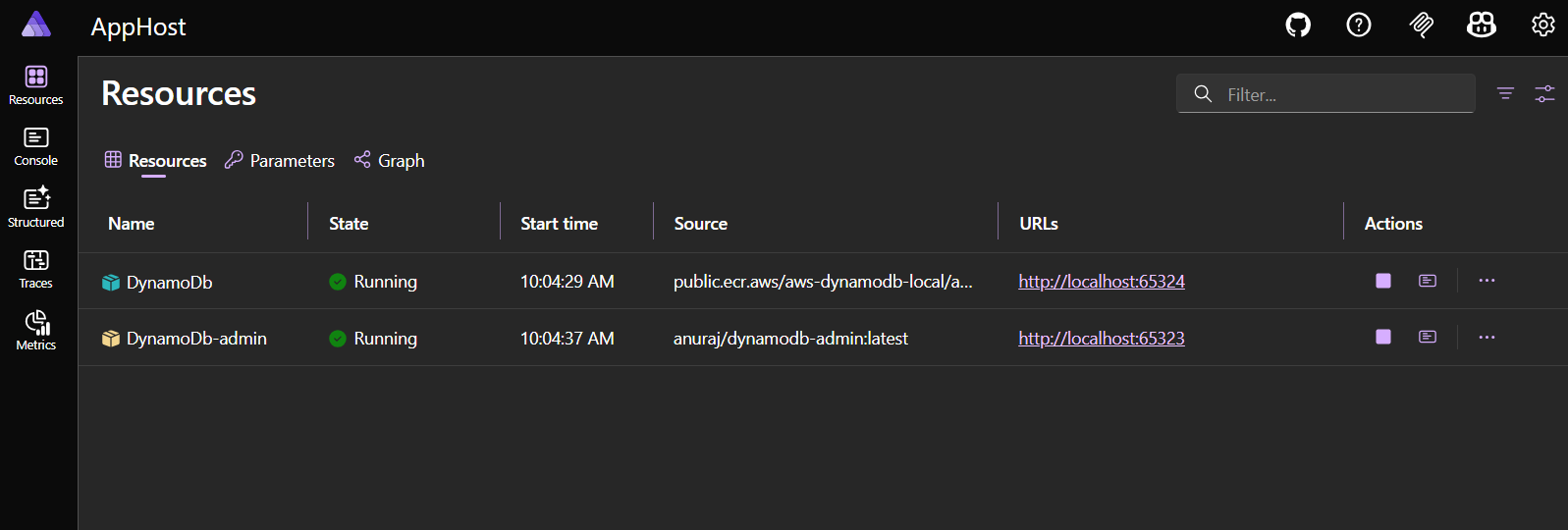
This way we can add custom containers to .NET Aspire and work with them.
Happy Programming.
If you find my content helpful, consider supporting my work. Your support helps me continue creating valuable resources for the community.

Found this useful? Share it with your network!
Copyright © 2026 Anuraj. Blog content licensed under the Creative Commons CC BY 2.5 | Unless otherwise stated or granted, code samples licensed under the MIT license. This is a personal blog. The opinions expressed here represent my own and not those of my employer. Powered by Jekyll. Hosted with ❤ by GitHub