Working with SQL Server 2025 in AI Chat Web
December 05, 2025 by Anuraj
AspNetCore DotNet AI RAG SqlServer
Recently Microsoft introduced Vector data type in SQL Server 2025. In this blog post we will customize the AI Chat Web Project from Microsoft to use SQL Server 2025, instead of SQLite. First create a project using the following command dotnet new aichatweb --name ChatApp. By default it will be using Sqlite for storing the embeddings. To use Sql Server 2025, we need to add the reference of Microsoft.SemanticKernel.Connectors.SqlServer. We can do this using dotnet add package Microsoft.SemanticKernel.Connectors.SqlServer --prerelease. I am using Docker and VS Code SQL Server extension to provision and run SQL Server 2025.
Once it is referenced, we need add a SQL Server connection string in the appsettings.json or appsettings.development.json. Now we can modify the Program.cs code like this.
//Comment or remove the Sqlite code.
//var vectorStorePath = Path.Combine(AppContext.BaseDirectory, "vector-store.db");
//var vectorStoreConnectionString = $"Data Source={vectorStorePath}";
//builder.Services.AddSqliteVectorStore(_ => vectorStoreConnectionString);
//builder.Services.AddSqliteCollection<string, IngestedChunk>(IngestedChunk.CollectionName, vectorStoreConnectionString);

//Use Sql Server.
var vectorStoreConnectionString = builder.Configuration.GetConnectionString("DefaultConnection")
    ?? throw new InvalidOperationException("Missing configuration: ConnectionStrings:DefaultConnection. See the README for details.");

builder.Services.AddSqlServerVectorStore(_ => vectorStoreConnectionString);
builder.Services.AddSqlServerCollection<string, IngestedChunk>(IngestedChunk.CollectionName, vectorStoreConnectionString);
Unlike SQLite, in this scenario we need to create the Sql Server database and create a table to store the embeddings. We can do this by executing following script.
CREATE DATABASE MyAppDb;
USE MyAppDb;

CREATE TABLE [data-chatapp-chunks] (
    [Key] UNIQUEIDENTIFIER PRIMARY KEY DEFAULT NEWSEQUENTIALID(),
    [Documentid] NVARCHAR(MAX),
    [Content] NVARCHAR(MAX),
    [Context] NVARCHAR(MAX),
    [Embedding] VECTOR(1536)
);
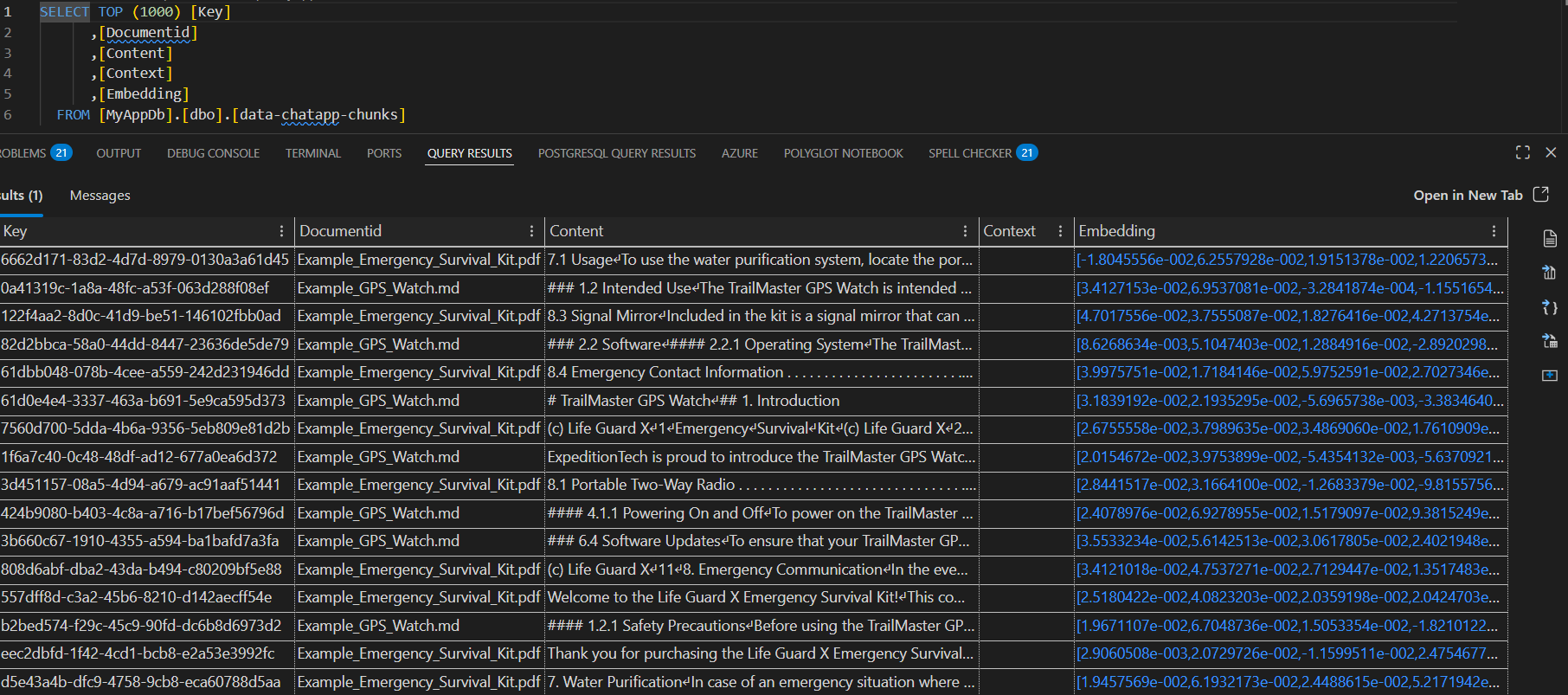
Once the database and table are created, we can use the connection string in the appsettings. Now we can run the application, and when we interact with the app, it will start using SQL Server instead of Sqlite.
Here is the screenshot SQL Server table.
We can use SQL Server 2025 instead of Qdrant as well, when we create ChatWeb App with Aspire, it will be using Qdrant as vector store. Next we will learn how we can use Sql Server 2025 instead of Qdrant. For the Aspire one, I am using Ollama and Qdrant. I created the project using this command dotnet new aichatweb --vector-store qdrant --provider ollama --name ChatWebApp.
Next we can modify the AppHost.cs file like this.
var sql = builder.AddSqlServer("sql")
    .WithLifetime(ContainerLifetime.Persistent)
    .WithImageTag("2025-latest")
    .WithEnvironment("ACCEPT_EULA", "Y");

var vectorDB = sql
    .WithDataVolume()
    .AddDatabase("MyAppDb","MyAppDb")
    .WithCreationScript("CREATE TABLE [data-chatapp-chunks] ([Key] UNIQUEIDENTIFIER PRIMARY KEY DEFAULT NEWSEQUENTIALID(),[Documentid] NVARCHAR(MAX),[Content] NVARCHAR(MAX),[Context] NVARCHAR(MAX),[Embedding] VECTOR(384));");
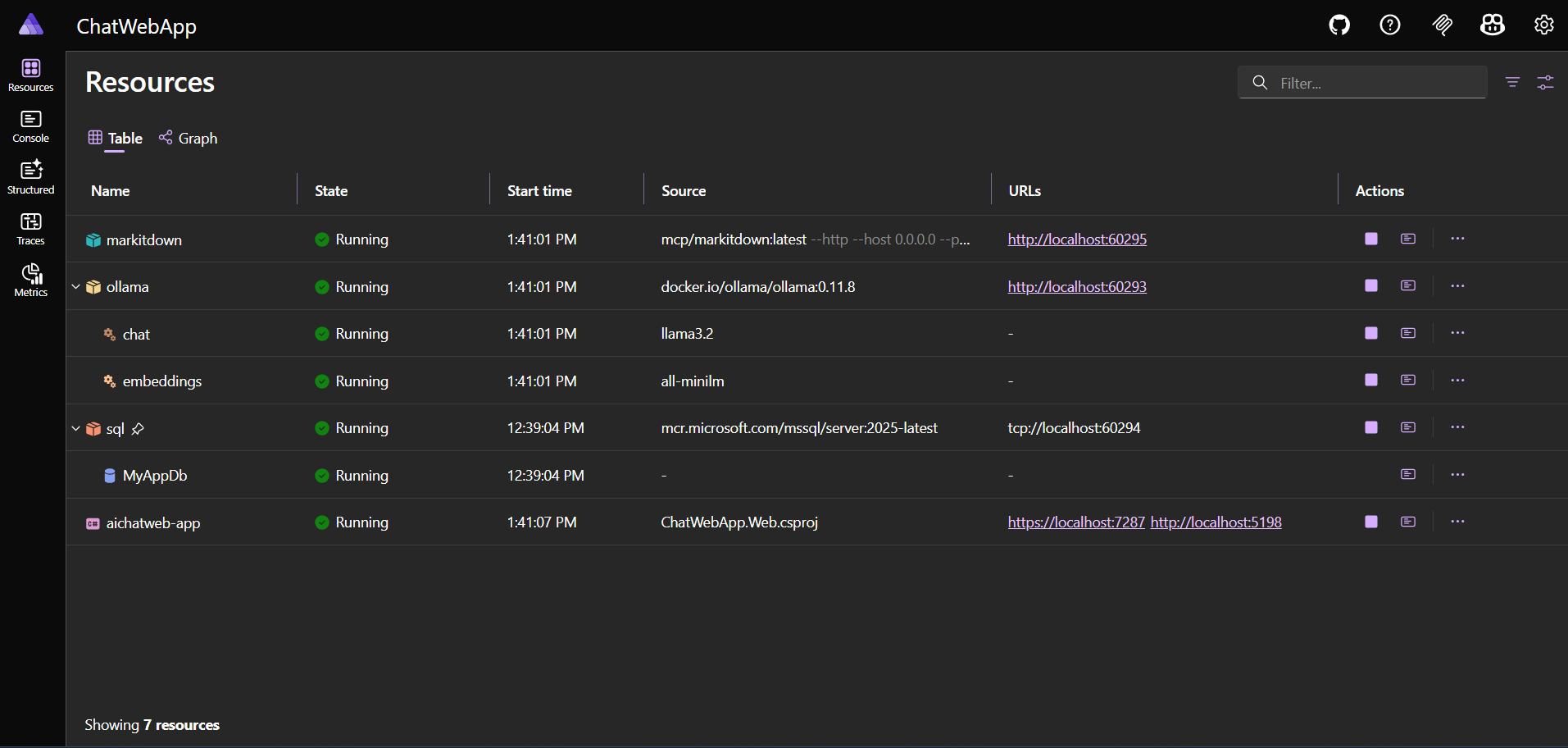
In the above code, I am creating SQL Server 2025 to the Aspire. And then I am creating database and table using the script. We need to add reference of Aspire.Hosting.SqlServer package to the AppHost project using the command dotnet add package Aspire.Hosting.SqlServer. Next we can modify the Web project, Program.cs file.
var vectorStoreConnectionString = builder.Configuration.GetConnectionString("MyAppDb")
    ?? throw new InvalidOperationException("Missing configuration: ConnectionStrings:DefaultConnection. See the README for details.");

builder.Services.AddSqlServerVectorStore(_ => vectorStoreConnectionString);
builder.Services.AddSqlServerCollection<Guid, IngestedChunk>(IngestedChunk.CollectionName, vectorStoreConnectionString);
Next we need to modify the IngestedChunk.cs file under the Services directory. And then we need to modify VectorDistanceFunction field value from DistanceFunction.CosineSimilarity to DistanceFunction.CosineDistance - since CosineSimilarity not implemented in Sql Server.
Here is the Aspire dashboard running on my machine.
There is a small change the SQL script, VECTOR(384) from VECTOR(1536) for the Embedding property.
This way we can use SQL Server 2025 instead of Sqlite and Qdrant. We can do this with very minimal code changes. Similarly we can use any other Database as well.
Happy Programming.
If you find my content helpful, consider supporting my work. Your support helps me continue creating valuable resources for the community.

Found this useful? Share it with your network!
Copyright © 2026 Anuraj. Blog content licensed under the Creative Commons CC BY 2.5 | Unless otherwise stated or granted, code samples licensed under the MIT license. This is a personal blog. The opinions expressed here represent my own and not those of my employer. Powered by Jekyll. Hosted with ❤ by GitHub