Code Execution Tool for AI Agents with Hyperlight Sandbox
October 02, 2026 by Anuraj
dotnet AI
In this blog post, we will explore how to add a code execution tool to an AI Agent in .NET using Hyperlight Sandbox. Language models are not great at calculations, but they are very good at writing code. So instead of asking the model to do the math, we let it write a small program and execute it. The problem is, we don’t want to run code generated by an LLM directly on our machine. Hyperlight Sandbox solves this by running the code in an isolated sandbox.
First we need to install the Hyperlight.HyperlightSandbox.Extensions.AI NuGet package. It contains the CodeExecutionTool class, which can be converted to an AIFunction and used with Microsoft Agent Framework. We also need the Python guest module, which provides the runtime used to execute the code.
dotnet add package Hyperlight.HyperlightSandbox.Extensions.AI
I am storing the endpoint and the API key in user secrets, so they don’t end up in source control.
dotnet user-secrets set "OPENAI_ENDPOINT" "https://your-endpoint"
dotnet user-secrets set "OPENAI_APIKEY" "your-key"
Now let’s create the code execution tool. It is just one line of code.
var codeExecutionTool = new CodeExecutionTool(new SandboxBuilder().WithPythonModule()).AsAIFunction();
The SandboxBuilder configures the sandbox and the WithPythonModule method adds the Python runtime to it. The CodeExecutionTool wraps the sandbox as a tool, and AsAIFunction converts it to an AIFunction. So for the agent, it is like any other tool.
The AIProjectClient expects a TokenCredential, but I wanted to use an API key. So I created a small ApiTokenCredential class, which always returns the same key as the token.
public class ApiTokenCredential : TokenCredential
{
    private readonly string _token;

    public ApiTokenCredential(string token)
    {
        _token = token;
    }

    public override AccessToken GetToken(TokenRequestContext requestContext,
        CancellationToken cancellationToken)
    {
        return new AccessToken(_token, DateTimeOffset.MaxValue);
    }

    public override ValueTask<AccessToken> GetTokenAsync(TokenRequestContext requestContext,
        CancellationToken cancellationToken)
    {
        return new ValueTask<AccessToken>(new AccessToken(_token, DateTimeOffset.MaxValue));
    }
}
This is fine for a quick demo, but for production code I would use DefaultAzureCredential or managed identity, since a static key never expires or rotates. Here is the full code for the agent.
using Azure.AI.Projects;
using HyperlightSandbox.Api;
using HyperlightSandbox.Extensions.AI;
using HyperlightSandbox.Guest.Python;
using Microsoft.Extensions.Configuration;

var configuration = new ConfigurationBuilder().AddUserSecrets<Program>().Build();

var endpoint = configuration["OPENAI_ENDPOINT"]!;
var deploymentName = "gpt-5-mini";
var apiToken = configuration["OPENAI_APIKEY"]!;

var codeExecutionTool = new CodeExecutionTool(new SandboxBuilder().WithPythonModule()).AsAIFunction();
var agent = new AIProjectClient(new Uri(endpoint), new ApiTokenCredential(apiToken))
    .AsAIAgent(
        model: deploymentName,
        instructions: @"You are intelligent and knowledgeable assistant who provides detailed
        and accurate answers. Use various tools to gather information and support your responses.",
        name: "HelloAgent", tools: [codeExecutionTool]);

while (true)
{
    Console.Write("You: ");
    var userInput = Console.ReadLine();
    if (string.IsNullOrWhiteSpace(userInput))
    {
        break;
    }

    Console.Write("Assistant: ");
    await foreach (var response in agent.RunStreamingAsync(userInput))
    {
        Console.Write(response.Text);
    }

    Console.WriteLine();
}
The agent is created with the code execution tool, and then we run a simple loop which reads the input from the console and streams the response back. Now let’s ask something which language models usually get wrong, like "What's the standard deviation of 12, 18, 25, 31 and 44?". Instead of guessing the answer, the model writes a few lines of Python code, the sandbox executes it, and the agent returns the exact result.
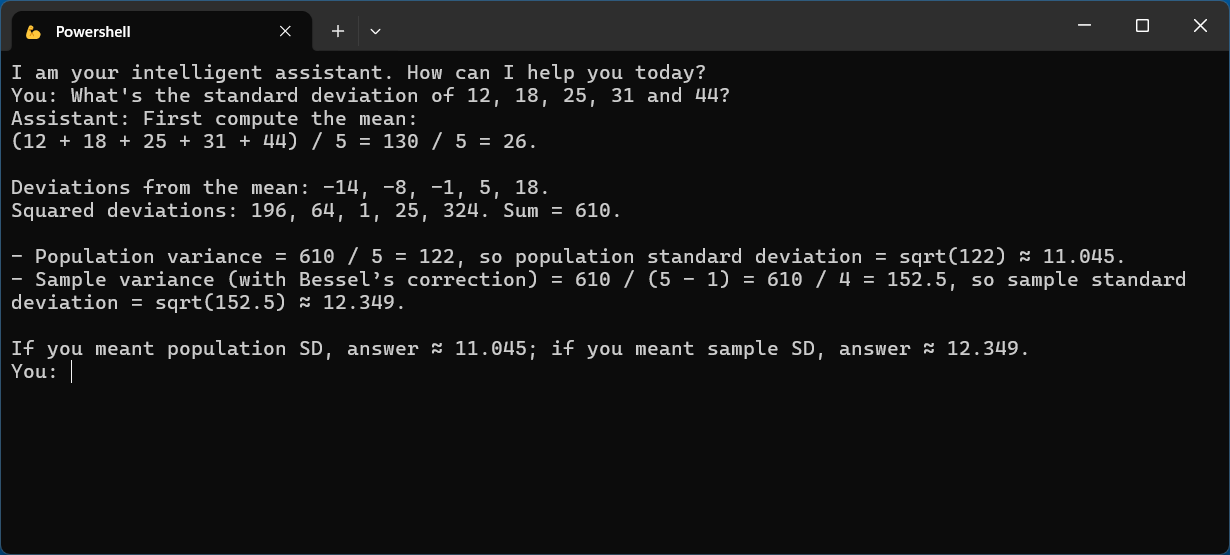
This way we can give an AI Agent the ability to write and execute code, without running that code directly on our machine. Because CodeExecutionTool is exposed as an AIFunction, it works the same way as any other tool in the agent.
Happy Programming.
If you find my content helpful, consider supporting my work. Your support helps me continue creating valuable resources for the community.

Found this useful? Share it with your network!
Copyright © 2026 Anuraj. Blog content licensed under the Creative Commons CC BY 2.5 | Unless otherwise stated or granted, code samples licensed under the MIT license. This is a personal blog. The opinions expressed here represent my own and not those of my employer. Powered by Jekyll. Hosted with ❤ by GitHub