Building an MCP App with C#
September 20, 2026 by Anuraj
dotnet mcp csharp
MCP tools are great at returning text and structured data. For many use cases, that’s all you need. But when the task calls for something more dynamic - like a chart, a form, a design canvas, or even a video player - plain text isn’t enough.
That’s where MCP Apps come in. They provide a standardized way to deliver interactive UIs directly from MCP servers. Instead of breaking the flow, your UI appears inline within the conversation, fully contextual, and ready to run in any compliant host.
MCP Apps build on the Model Context Protocol by allowing tools to declare their own UI resources. Here’s how it works in practice:
- Tool definition - Your tool specifies a
ui://resource that contains its HTML interface. - Tool call - The LLM invokes the tool running on your server.
- Host rendering - The host retrieves the resource and displays it inside a sandboxed iframe.
- Bidirectional communication - The host sends tool data to the UI via notifications, while the UI can in turn call other tools through the host.
In this blog post I will be building a visualization option for the Sqlite MCP server - this feature will help us to provide question in natural language and the sqlite mcp server will help to visualize it.
First we need add reference of ModelContextProtocol.Extensions.Apps nuget package, we can do it using the following command dotnet package add ModelContextProtocol.Extensions.Apps. Next we need to update the MCP Server registration with MCP Apps. Here is the code.
builder.Services
    .AddMcpServer(options =>
    {
        options.ServerInfo = new Implementation
        {
            Name = "Sqlite MCP Server",
            Version = "1.1.0"
        };
        options.Capabilities = new ServerCapabilities
        {
            Tools = new ToolsCapability(),
            Resources = new ResourcesCapability(),
        };
    })
    .WithStdioServerTransport()
    .WithToolsFromAssembly()
    .WithResourcesFromAssembly()
    .WithTasks(store)
    .WithMcpApps();

await builder.Build().RunAsync();
Next we need to create a resource which should return HTML contents. Here is the resource implementation.
[McpServerResource(UriTemplate = "ui://sqlite-app/visualize",
    Name = "sqlite-visualize-ui", MimeType = "text/html;profile=mcp-app")]
[Description("Interactive SQLite Query visualization UI")]
public static string GetSqliteVisualizeUi() =>
    File.ReadAllText(Path.Combine(UiDir, "visualize.html"));
Now we need a Tool implementation which uses this resource to display the HTML UI.
[McpServerTool(Destructive = false, ReadOnly = true, Name = "visualize")]
[McpMeta("ui", JsonValue = """{ "resourceUri": "ui://sqlite-app/visualize" }""")]
[Description("Get the Visualization for a SQL query.")]
public async Task<CallToolResult> Visualize([Description("SQL query to get the query visualization for")] string sqlQuery,
    [Description("Chart type for the visualization, supported options are Line, Bar, Area, Donut, Pie, and Scatter only.")] string chartType,
    CancellationToken cancellationToken)
{
    try
    {
        using var connection = CreateOpenConnection();

        using var command = connection.CreateCommand();
        command.CommandText = sqlQuery;

        using var reader = await command.ExecuteReaderAsync(cancellationToken);

        return new CallToolResult
        {
            Content = [new TextContentBlock { Text = $"Visualization for query: {sqlQuery}" }],
            StructuredContent = JsonSerializer.SerializeToElement(new
            {
                chartType,
                data = ToChartData(reader, reader.GetName(0),
                    [.. Enumerable.Range(1, reader.FieldCount - 1).Select(i => reader.GetName(i))])
            }, jsonSerializerOptions)
        };


    }
    catch (Exception ex)
    {
        return new CallToolResult
        {
            Content = [new TextContentBlock { Text = $"Error getting visualization: {ex.Message}" }],
        };
    }
}
The McpMeta attribute tells the MCP Host - this tool has a UI, you can find it at this resource URI. This tool does not return HTML, it return normal data - we need to handle the response in the HTML. We need to make sure the resourceUri in the tool must exactly match the UriTemplate of the resource. Next we need to UI directory and html file inside the directory with visualize.html. In the html file, we need following Javascript code.
let nextRequestId = 1;
const pendingRequests = new Map();

window.addEventListener("message", (event) => {
    const msg = event.data;
    if (!msg || msg.jsonrpc !== "2.0") return;

    if (msg.id !== undefined && pendingRequests.has(msg.id)) {
        const { resolve, reject } = pendingRequests.get(msg.id);
        pendingRequests.delete(msg.id);
        msg.error ? reject(new Error(msg.error.message || JSON.stringify(msg.error))) : resolve(msg.result);
        return;
    }

    if (msg.method === "ui/notifications/tool-input") handleToolInput(msg.params);
    if (msg.method === "ui/notifications/tool-result") handleToolResult(msg.params);
});

async function visualize() {
    const query = document.getElementById("Query").value;
    const chartType = document.getElementById("ChartType").value;
    //This is the tool call implementation.
    //Provide the name of the function and parameters.
    const result = await sendRequest('tools/call', {
        name: 'visualize',
        arguments: { sqlQuery: query, chartType: chartType }
    });
    handleToolResult(result);
}

function handleToolInput(params) {
    //console.log("Received tool input:", params);
}

function handleToolResult(params) {
    const structuredContent = params.structuredContent;
    if (!structuredContent) return;
    //This is the function renders the chart in the UI.
    renderChart("#chart", structuredContent.data, structuredContent.chartType);
}

function sendRequest(method, params) {
    const id = nextRequestId++;
    return new Promise((resolve, reject) => {
        pendingRequests.set(id, { resolve, reject });
        window.parent.postMessage({ jsonrpc: "2.0", id, method, params: params || {} }, "*");
    });
}

function sendNotification(method, params) {
    window.parent.postMessage({ jsonrpc: "2.0", method, params: params || {} }, "*");
}

async function initialize() {
    if (window.parent === window) {
        console.error("This UI must be loaded by an MCP app host.");
        return;
    }

    await sendRequest("ui/initialize", {
        protocolVersion: "2025-11-25",
        appInfo: { name: "sqlite-mcp-server", version: "1.0.0" },
        appCapabilities: {},
    });

    sendNotification("ui/notifications/initialized", {});
}

initialize();
The full source code for this implementation available here
Here is the screenshot of the Sqlite MCP Server with Visualization UI running on VS Code.
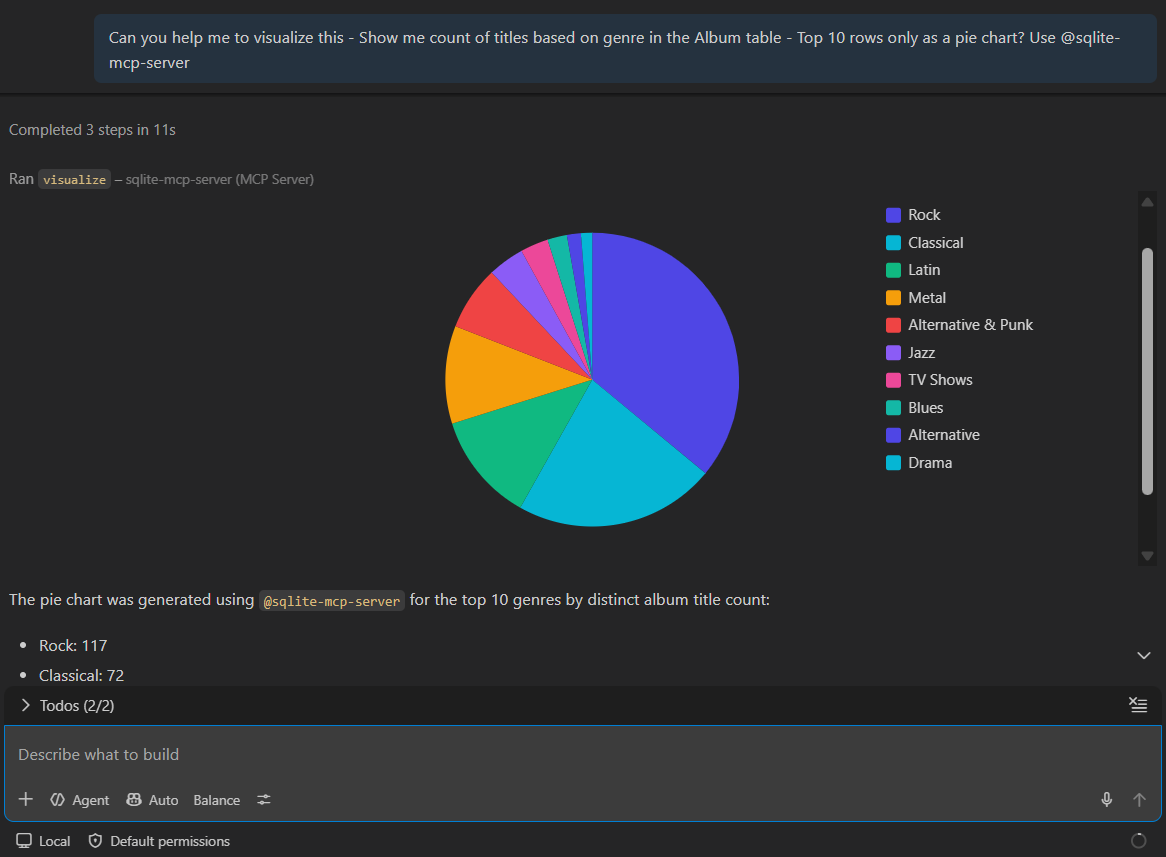
MCP Apps extend the Model Context Protocol by enabling tools to deliver interactive UIs - from charts and forms to design canvases and video players - directly inside conversations. They work by declaring a ui:// resource, which the host renders in a sandboxed iframe, while supporting bidirectional communication between the UI and other tools. This makes MCP Apps a standardized way to embed dynamic, contextual experiences seamlessly into AI chat clients.
Happy Programming.
If you find my content helpful, consider supporting my work. Your support helps me continue creating valuable resources for the community.

Found this useful? Share it with your network!
Copyright © 2026 Anuraj. Blog content licensed under the Creative Commons CC BY 2.5 | Unless otherwise stated or granted, code samples licensed under the MIT license. This is a personal blog. The opinions expressed here represent my own and not those of my employer. Powered by Jekyll. Hosted with ❤ by GitHub