GitHub Copilot CLI - Bring Your Own Key (BYOK)
May 24, 2026 by Anuraj
AI GitHub Copilot
In this blog post, we will explore how to use your own LLMs instead of GitHub hosted models. This is called BYOK - Bring Your Own Key. BYOK helps us to
- Keep your data private: Your prompts and code stay within your own systems.
- Choose what works best: Use the AI model that fits your team’s needs and way of working.
- Save on costs: If you already have systems running for AI workloads, adding a Copilot endpoint can cost very little extra.
In this blog I will be using Azure Models. To use Azure, we need to set the following environment variables.
export COPILOT_PROVIDER_BASE_URL=https://<YOUR_PROJECT_NAME>.services.ai.azure.com/openai/v1
export COPILOT_PROVIDER_TYPE=azure
export COPILOT_PROVIDER_API_KEY=YOUR_AZURE_FOUNDRY_API_KEY
export COPILOT_MODEL=DeepSeek-V4-Pro
Now we can run the Copilot CLI using copilot command - which will use the DeepSeek-V4-Pro model.
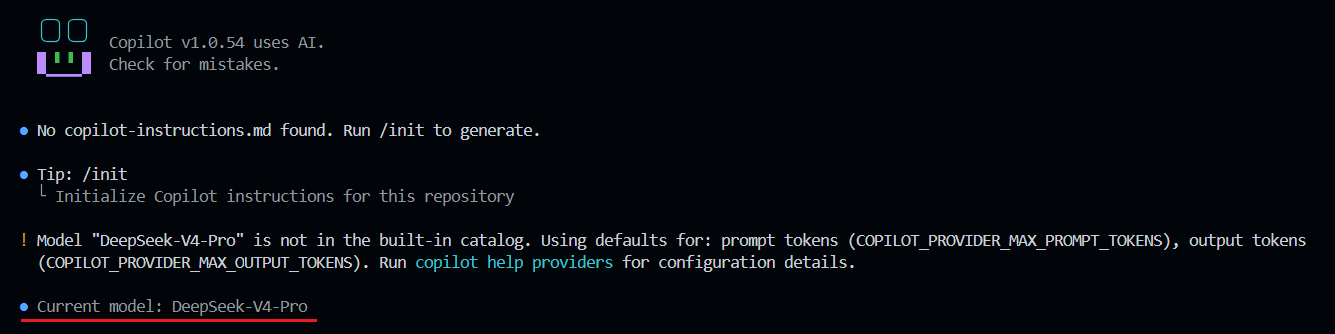
And if we want to use Ollama models or any other local LLMs, we need to set the following environment variables.
export COPILOT_PROVIDER_BASE_URL=https://<your-endpoint>/v1
export COPILOT_MODEL=<your-model-name>
This way we can use Azure Foundry models in GitHub Copilot CLI. We can use local models when we are working with Privacy-sensitive code or Offline workflows or learning & experimentation with LLM behavior. When it is not recommended for High-accuracy, large-context, or production-critical tasks - cloud models remain superior in speed and reliability.
Happy Programming
If you find my content helpful, consider supporting my work. Your support helps me continue creating valuable resources for the community.

Found this useful? Share it with your network!
Copyright © 2026 Anuraj. Blog content licensed under the Creative Commons CC BY 2.5 | Unless otherwise stated or granted, code samples licensed under the MIT license. This is a personal blog. The opinions expressed here represent my own and not those of my employer. Powered by Jekyll. Hosted with ❤ by GitHub