Working with Jev from C# and .NET
October 03, 2026 by Anuraj
dotnet ai csharp
Most of us are used to LLMs which take a prompt and return text. Jev, from TypeSafe AI, works differently. It is a System One model - it doesn’t generate text at all. You give it some context (the state) and one or more typed questions, and it returns typed answers with probabilities. Since the answers come back as data, your code can branch on them directly - no parsing of free text, and no prompts like “reply only with one of these words”.
Jev supports three question types.
- Choice - pick one option from a list you provide. The answer also includes the probability of each option.
- Noul - a yes/no question, answered as the probability of “yes”.
- Score - a position on an ordered scale you define.
Questions in a single request run in parallel against the same state, so you can ask multiple things about the same input in one call.
A good use case for Jev is a decision point in your code. Think of a support ticket arriving in your system. You want to know which team should own it, whether it is a defect, and how urgent it is. These are classification and scoring tasks - you don’t need an LLM to write paragraphs for them, you need fast, structured answers you can route on. In this blog post I will be building exactly that - one request with three questions about a ticket: the owning team (Choice), is it a bug (Noul) and the urgency (Score).
First we need to create a console application and add a reference of the OllamaSharp nuget package. System One support was added in version 5.5.0, so make sure you are using that version or later.
dotnet new console -n JevCsharpDemo
cd JevCsharpDemo
dotnet add package OllamaSharp
Next we need an API key. Create one in your OpenRouter account and store it in an environment variable named OPENROUTER_API_KEY. If you are on Windows, remember to restart your terminal or Visual Studio after setting the variable, otherwise the process will not see the new value.
OllamaSharp’s SystemOneAsync method maps to the /v1/systemone endpoint. OpenRouter exposes a System One API at https://openrouter.ai/api/v1/systemone, so if we set the base address to https://openrouter.ai/api/, the call lands in the right place. The API key goes in as a bearer token on the HttpClient. Here is the code.
using System.Net.Http.Headers;
using OllamaSharp;
using OllamaSharp.Models;

var apiKey = Environment.GetEnvironmentVariable("OPENROUTER_API_KEY")?.Trim();

if (string.IsNullOrEmpty(apiKey))
    throw new InvalidOperationException("OPENROUTER_API_KEY is not set.");

var http = new HttpClient { BaseAddress = new Uri("https://openrouter.ai/api/") };
http.DefaultRequestHeaders.Authorization =
    new AuthenticationHeaderValue("Bearer", apiKey);

var ollama = new OllamaApiClient(http);

var response = await ollama.SystemOneAsync(new SystemOneRequest
{
    Model = "jev-latest",
    State = "My checkout page shows a blank screen after I click Pay.",
    Questions = new()
    {
        ["team"] = new SystemOneChoiceQuestion
        {
            Instructions = "Which team should own this ticket?",
            Criteria = new()
            {
                ["payments"] = "Checkout, billing, or payment processing issues.",
                ["frontend"] = "Rendering, layout, or browser compatibility issues.",
                ["account"] = "Login, permissions, or profile issues."
            }
        },
        ["is_bug"] = new SystemOneNoulQuestion
        {
            Instructions = "Is the customer reporting a software defect?"
        },
        ["urgency"] = new SystemOneScoreQuestion
        {
            Instructions = "How urgent is this ticket?",
            Criteria = ["Can wait", "This week", "Blocking revenue"]
        }
    }
});
The model name jev-latest always points to the newest Jev release. If you have tuned your thresholds against a specific version, you can pin it with something like typesafe/jev-1.13. The State can be a plain string, like above, or structured data. For a Choice question, the Criteria dictionary maps each option to a description, and these descriptions matter, because that is how Jev understands what each option means. For a Score question, the Criteria array is the ordered scale, so a three level scale gives you a score between 0 and 2.
Each answer in response.Answers is a typed object, so we can cast it to the matching type and use it like any other value in our code.
var team = (SystemOneChoiceAnswer)response.Answers["team"];
var isBug = (SystemOneNoulAnswer)response.Answers["is_bug"];
var urgency = (SystemOneScoreAnswer)response.Answers["urgency"];

Console.WriteLine($"Team: {team.Choice}");
Console.WriteLine($"Bug probability: {isBug.Noul:P0}");
Console.WriteLine($"Urgency: {urgency.Score:F2}");

if (urgency.Score >= 1.5 && isBug.Noul > 0.7)
{
    Console.WriteLine($"Escalating to the {team.Choice} on-call engineer.");
}
else
{
    Console.WriteLine($"Adding to the {team.Choice} team backlog.");
}
This is where the probabilities become useful. Since isBug.Noul is a probability and not a flat yes or no, you decide how confident you need to be before acting. You could page someone above 0.7, queue the ticket for human review between 0.4 and 0.7, and ignore anything below that. The Choice answer also carries a probability for each option, so you can apply the same logic when the model is torn between two teams.
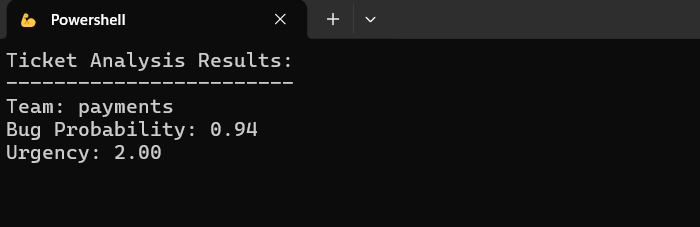
Here is the output of the application.
Jev is not a replacement for a chat model. If you need a drafted reply to the customer, you still need an LLM. But the decision about where the ticket goes, and whether to wake someone up, is a better fit for something fast, cheap and structured. A common pattern is to let Jev make the routing decision first, and call an LLM only when you actually need text. The same idea works for content moderation, intent detection, model routing and guard checks before an agent performs an action.
One more thing - since OllamaSharp’s System One support targets Ollama’s own /v1/systemone endpoint, the same code can talk to a local Ollama instance (version 0.35.0 or later) running a decision model like nimble. Only the base address and the model name change.
Jev is a different kind of model - instead of generating text, it returns typed decisions with probabilities, which makes it a good fit for routing, classification and scoring in your applications. With OllamaSharp 5.5.0 and OpenRouter, calling it from C# takes only a few lines of code, and the answers can be used directly in your business logic.
Happy Programming.
If you find my content helpful, consider supporting my work. Your support helps me continue creating valuable resources for the community.

Found this useful? Share it with your network!
Copyright © 2026 Anuraj. Blog content licensed under the Creative Commons CC BY 2.5 | Unless otherwise stated or granted, code samples licensed under the MIT license. This is a personal blog. The opinions expressed here represent my own and not those of my employer. Powered by Jekyll. Hosted with ❤ by GitHub